

Knowledge Search
Semantic search across your organization's ingested documents, answered with ranked source matches and the exact passage highlighted on the original page.
Knowledge search answers questions from your organization's own documents: company profiles, policies, SOPs, product documentation, anything ingested into the Knowledge Base. It returns the relevant passages together with the document they came from, so an answer can be checked rather than trusted.
Flux reaches for it first on questions about your company, its customers, its products, or its internal documents, before web search or connected apps.
Reading the answer
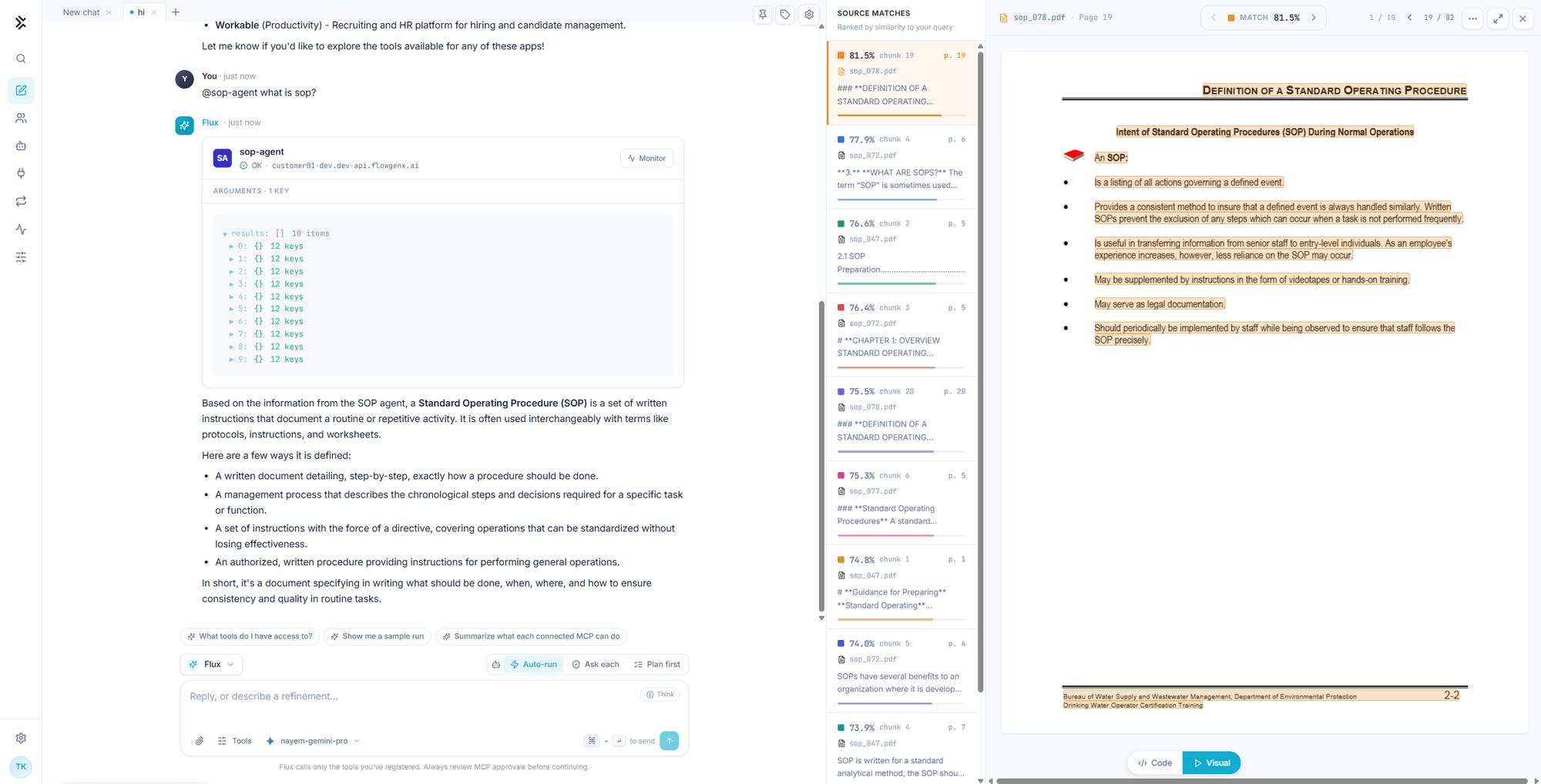
Three panes work together.
The transcript carries the answer in prose, written from the retrieved passages.
Source matches lists what retrieval actually found, ranked by similarity to your question. Each row shows its score, the chunk, the page, the source document, and the opening of the passage. A visible spread of scores is useful information: several strong matches means the answer is well supported, one weak match near the top means it is not.
The document view opens the source page itself with the matching region highlighted, so you can read the surrounding context rather than a snippet. Step through matches with the match navigation, or page through the document directly.
Highlighting is available for documents ingested with page regions recorded. Older documents ingested before that support still return matches and page numbers, they just do not paint the region. Re-ingesting a document adds the highlight.
Asking well
Ask in natural language, and ask for the thing rather than the document:
what is the preferred drug testing policy for employees?is better than "search the HR PDFs", because retrieval is semantic. Naming the concept you care about gives it more to match on than naming the filing cabinet.
Two habits pay off:
- Name the scope when it matters. "In our security policy, what is the password rotation period?" narrows retrieval toward the right document.
- Check the top score before acting. If the best match is weak, the document you want probably is not ingested yet.
Where the documents come from
Documents are authored, uploaded, and managed in the Knowledge Base, including how they are chunked and which collections they belong to. Chat reads from that store and never writes to it.
| Task | Where |
|---|---|
| Upload or remove a document | Knowledge Base |
| Change chunking or retrieval settings | Chunking strategies, Retrieval configuration |
| Check what a co-worker can see | The Context tab in Co-Worker Studio |
Knowledge search requires an enabled co-worker
Knowledge search is one of the capabilities gated behind the co-worker publish switch, alongside conversation-history search and managed skills. With the co-worker disabled, the tool is withheld from the run and blocked at execution, and Flux answers from the current conversation, saved memories, and other connected tools instead.
If knowledge search appears to be missing, open Co-Worker Studio and check the Enable switch in the header before looking anywhere else. The gate takes effect on the next message in either direction. See Governance and control.
Dashboard Apps
Ask for a dashboard and get a running React app in the panel, with charts, tabs, a source view and a console. Point it at a routine to keep it live, then publish it to a link.
Agents
Register a webhook agent by pasting a curl command, or pick one from the Agent Registry. Registered agents become tools Flux can call, and you can mention them by name.