

Routines & Watchers
Saved playbooks that run on a schedule, a webhook, or a channel message, deliver their own result, and can pause for your approval.
A routine is a saved playbook that runs without you. It fires on a trigger, does the work, delivers the result, and can pause mid-run for your input. Routines are how a good chat session becomes something that happens every Monday at 8am.
Two kinds of routine
| Type | What it is | Use for |
|---|---|---|
| Markdown | A playbook Flux runs later with its full tool surface | Anything shaped as gather, process, format, deliver |
| Code | Python, JavaScript, or TypeScript run in a sandbox | Pure computation and scripts |
Prefer markdown. A playbook of steps written in plain language keeps the agent's judgment available at run time, which is usually the reason you wanted an agent rather than a cron job. Reach for code when the task is genuinely deterministic.
Triggers
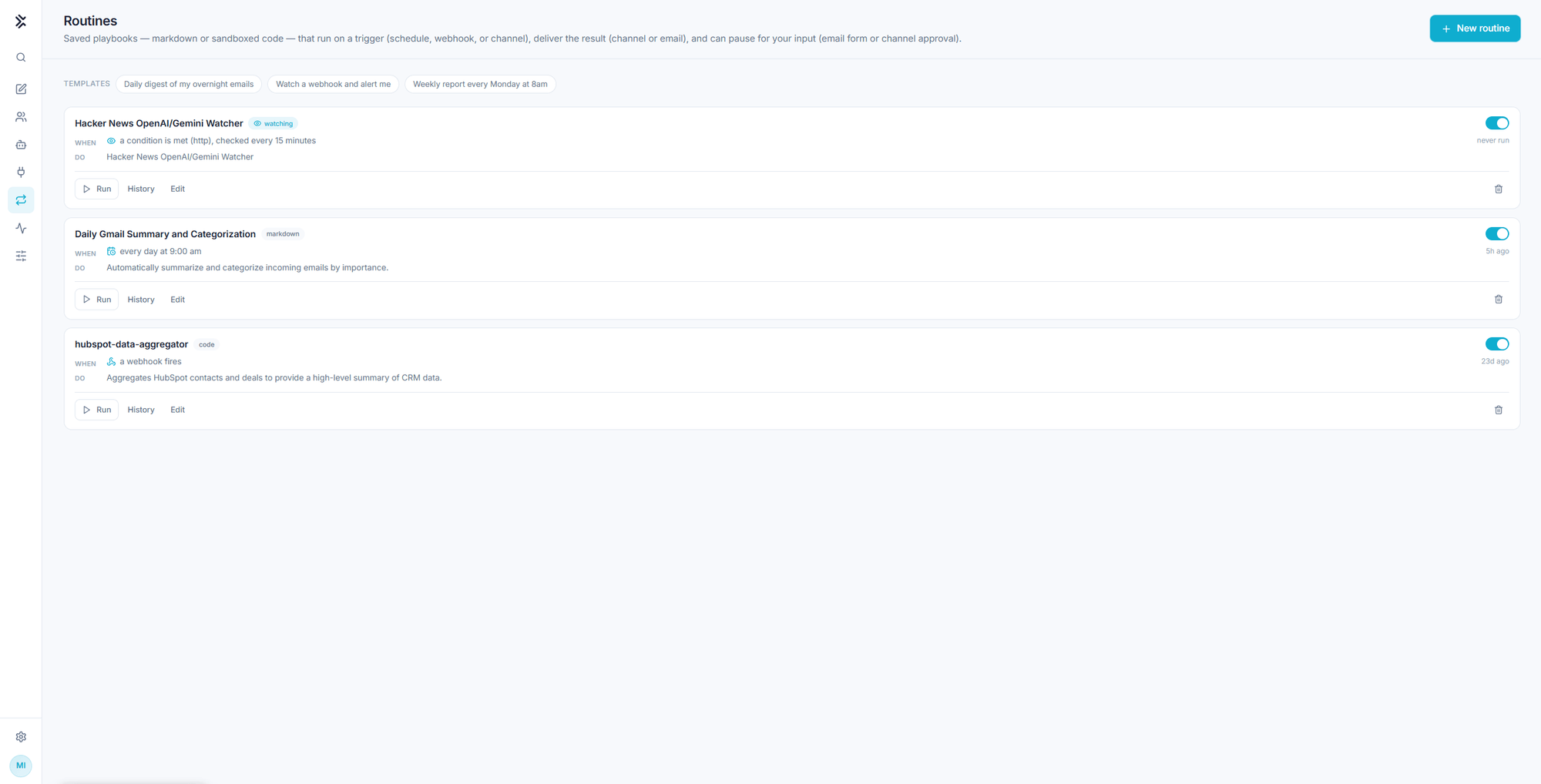
Each routine card states its trigger on the WHEN line and its purpose on the DO line.
| Trigger | Example |
|---|---|
| Schedule | Every day at 9:00 am |
| Webhook | A webhook fires |
| Channel | A message arrives in a connected channel |
| Condition | A condition is met, checked every 15 minutes |
The starter templates on the page are the three shapes most people want first: a daily digest of overnight email, a webhook watch that alerts you, and a weekly report every Monday at 8am.
Delivery is configuration, not a step
This is the rule that separates a routine that works from one that quietly does nothing.
A routine's instructions should produce the final result as its output. Where that result goes, a channel or an email, is configured on the routine itself.
Do not write "then send it to the team channel" into the steps. A routine whose instructions try to deliver the result usually ends up fetching bot tokens and chat ids instead of doing the work. Write the playbook so it produces the answer, and configure delivery on the routine.
Pausing for a human
A routine can stop and wait for you, either with an email form or a channel approval, then continue with your answer. Use it for the step a routine genuinely should not decide alone: the escalation, the refund, the message that goes to a customer.
Running and reviewing
| Action | What it does |
|---|---|
| Run | Runs it now, ignoring the trigger |
| History | Past runs and their results |
| Edit | Opens the routine for changes |
| Toggle | Enables or disables it without deleting it |
Each card also shows when it last ran, including never run, which is the first thing to check when a routine has not been doing its job.
Every run also lands in Monitor alongside every other execution the chat triggered.
Watchers
A watcher is the lighter-weight relative of a routine: it checks a condition every few minutes and, when the condition becomes true, continues this chat with a new turn describing what it found.
Ask for one in plain language, for example "watch this page and tell me when the status changes". Two kinds of check exist, and the cheap one is the default:
- Content check. Matches a pattern, a substring, or the absence of one. No model call per check, so it costs nothing to poll.
- Semantic check. A natural-language condition, evaluated only when the page has actually changed, so cost stays bounded.
Watchers fire on each new match rather than on every tick, and can be set to stop after the first one.
Routines and dashboards
A routine that gathers data can expose its result at a data endpoint, and a generated dashboard can read that endpoint at runtime. The routine reruns on its schedule and the dashboard shows the fresh numbers without being regenerated. See Dashboard apps.
What changes inside a routine run
A running routine is headless. Nobody is present to answer a question, so it proceeds on its best judgment unless you built in a pause.
It also cannot author routines while it runs. Routine-management tools are withheld during a run, so a playbook that reads like a routine specification executes the work instead of creating a copy of itself.
Routines belong to the account that created them and run with its connections and credentials. Scope the account before you schedule work that runs unattended. See Governance and control.