

Configuration
Choose the models the chat uses, set gateway credentials for FlowGenX agent calls, share configuration values with your automations, and mint API keys for headless callers.
Configuration is the account-level settings page for FlowGenX Chat. Four tabs: Models, Gateway auth, Shared env, and API keys.
Models
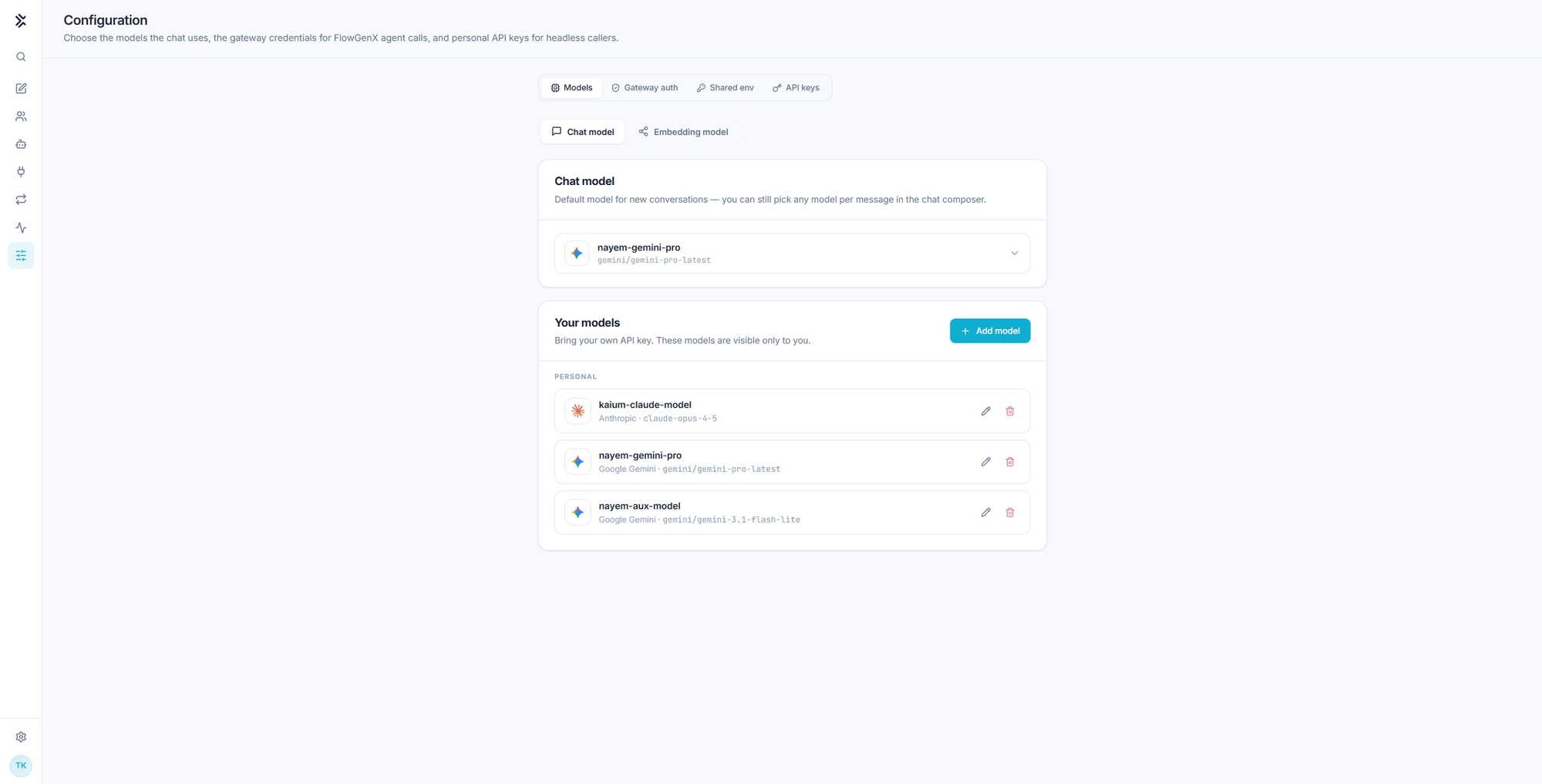
The chat uses more than one model, and each has its own sub-tab:
| Sub-tab | What it sets |
|---|---|
| Chat model | The default for new conversations. You can still pick any model per message in the composer |
| Aux model | Your co-worker's background model, for low-effort work like context compression and summarization. Chat always uses your primary model |
| Embedding model | Powers memory and knowledge-base search. Automatic uses your organization's default |
Aux model only appears once a co-worker is published, because that is the only thing that uses it. See Co-Worker.
Your models
Models are registered with your own provider API key and are visible only to you. Each entry carries a name you choose, its provider, and the underlying model id:
| Name | Provider | Model id |
|---|---|---|
kaium-claude-model | Anthropic | claude-opus-4-5 |
nayem-gemini-pro | Google Gemini | gemini/gemini-pro-latest |
nayem-aux-model | Google Gemini | gemini/gemini-3.1-flash-lite |
The name is what appears in the composer's model picker, so name them for the job rather than for the vendor. Add model registers a new one; the pencil and bin icons edit and remove.
Register at least two: something fast for lookups and formatting, something stronger for analysis. Switching costs one click per session, and the default only decides where a new conversation starts. See Working in a chat.
Changing the embedding model changes how text is vectorized, and it drives both memory recall and knowledge-base search. Content embedded with a different model will not match cleanly against new queries, so treat this as a migration rather than a preference, and expect to re-embed. Leaving it on Automatic follows your organization's default and avoids the problem.
If a tab reports that no models are allocated to your organization yet, that is a platform-side allocation rather than something to fix here.
Gateway auth
Credentials the chat attaches to outgoing calls to the FlowGenX gateway. Two types:
| Type | What you provide |
|---|---|
| API key | The key, plus the header name to send it in, X-API-Key by default |
| OAuth 2.0 | Client id, client secret, token URL, and scopes |
The selected credential is attached to gateway-bound calls, so platform agent calls fail here first if this is unset or stale. When a stored secret is already saved, leaving the field blank keeps it rather than clearing it.
Shared env
Configuration values your automations can read: keys and values, with any value markable as a secret so it is stored encrypted.
Use it for the values a routine or a code run needs and should not carry inline, and rotate them here rather than editing every playbook that uses them.
API keys
Personal keys for headless callers: the workflow engine's Flux Agent node and scripts. Name a key after what will use it, for example workflow engine, and revoke it here when that caller retires.
A key is an identity, not a password. A run authenticated with your key executes as you, with your persona, your memory, your skills, and your connections. Anything it does in a system of record, you did.
Mint one key per caller so a revocation is surgical, and never paste a key into a shared workflow that other people can edit.
This is the field the Flux Agent node calls Flux API key. A workflow that reaches your co-worker from Slack or Google Chat is authenticated with a key minted on this tab. See Channels and proactive work.
Monitor
Every execution the chat triggered, synchronous or asynchronous, with its status, duration, payload, and live event stream.
FlowGenX Co-Worker
A named AI teammate with its own identity, memory, skills, and presence in your chat channels. Configure it once in Co-Worker Studio and it works with your team.