

FlowGenX Chat
An agentic workspace where a conversation produces real artifacts. Ask a question, get a dashboard, a deck, a chart, or a cited answer from your documents.
FlowGenX Chat is where you work with Flux, the coordinator agent. It reaches your connected systems through MCP servers, registered agents, and built-in tools, and it does not stop at prose: a request for a dashboard returns a running dashboard, a request for a report returns a deck you can export.
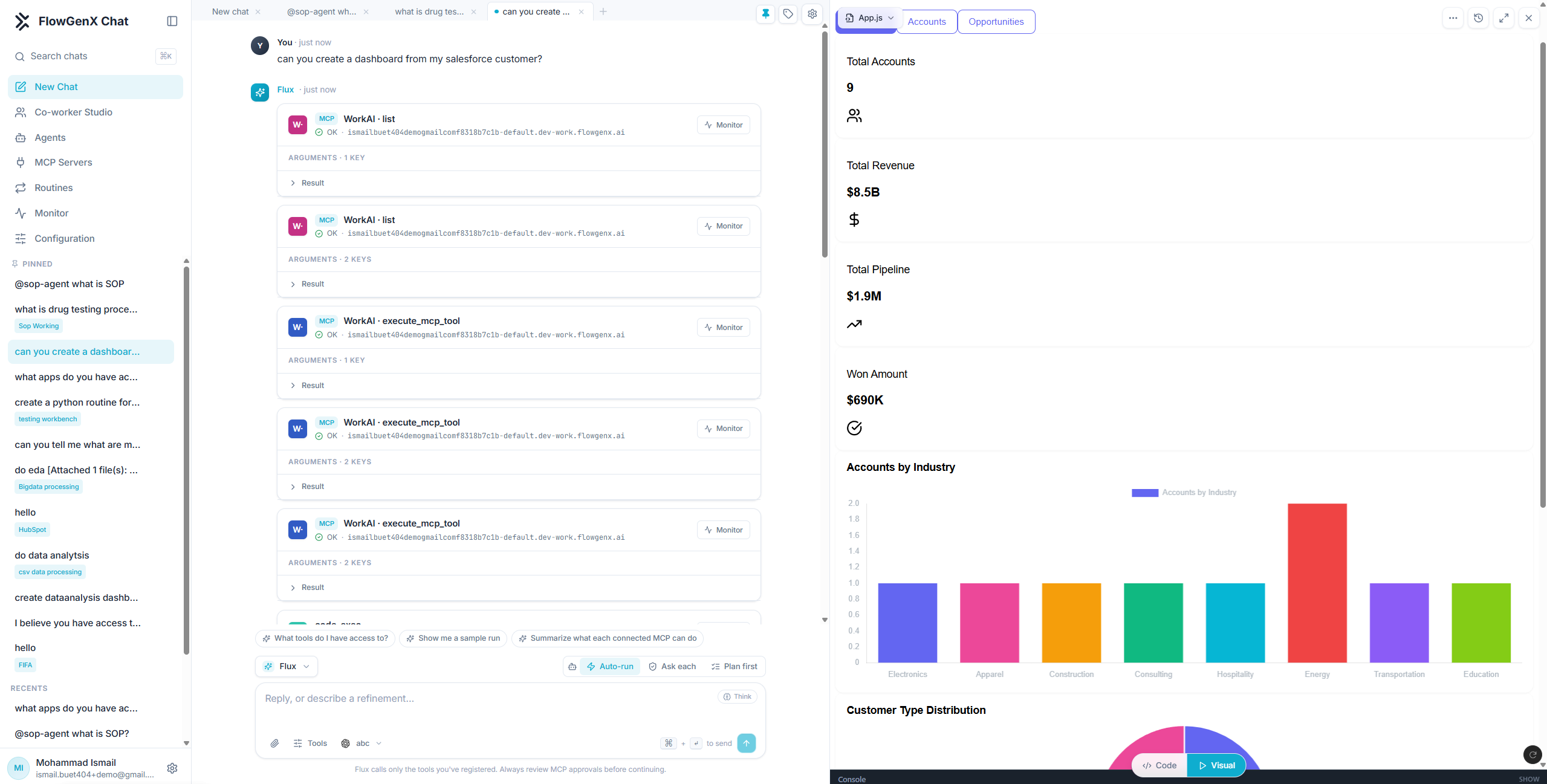
That screenshot is one question: "can you create a dashboard from my salesforce customer?" The left pane is the work, the right pane is the result, and both are live.
What you can ask it to do
Build a dashboard app
A real React app with charts and tabs, running in the panel, with a code view and a console. Publish it to a link when it is right.
Produce charts, docs and decks
Charts you can read, documents you can export as PDF, and slide decks you can export as PowerPoint.
Search your documents
Semantic search across your organization's knowledge base, with ranked source matches and the exact passage highlighted on the page.
Call your own agents
Register a webhook agent by pasting a curl, or let A2A-protocol agents be discovered automatically, then mention one by name.
Connect MCP servers
Connect external Model Context Protocol servers and their tools become available to the coordinator, with per-tool approval.
Save work as a routine
Turn a playbook into something that runs on a schedule, a webhook, or a channel message, and delivers its result on its own.
The workspace
| Area | What it is |
|---|---|
| Left rail | New Chat, Co-worker Studio, Agents, MCP Servers, Routines, Monitor, Configuration |
| Chat list | Pinned and recent conversations, each taggable, searchable with ⌘K |
| Tabs | Several conversations open at once across the top, like editor tabs |
| Transcript | Messages plus a card per tool call, showing arguments, result, and status |
| Composer | The model picker, the run mode, tool scoping, attachments, and the Think toggle |
| Artifact panel | The right-hand pane where charts, documents, decks, and dashboards render |
Read Working in a chat for how the composer controls change what Flux is allowed to do.
Tool calls are shown, not hidden
Every tool call Flux makes appears in the transcript as its own card: which server or tool ran, the status, how many arguments it passed, and an expandable result. A Monitor link on each card opens that execution's record.
This matters more than it sounds. When an answer is wrong, the question is usually not "what did the model think?" but "what did it actually call, and what came back?". That is on screen by default.
The composer footer states the boundary plainly: Flux calls only the tools you have registered. Nothing reaches a system you have not connected.
How it relates to the rest of the platform
| Surface | Use it for |
|---|---|
| FlowGenX Chat | Open-ended work you drive in a conversation, one request at a time |
| FlowGenX Co-Worker | A named teammate with persistent memory and its own presence in Slack and Google Chat |
| Workflows | Deterministic, repeatable processes on a trigger |
Chat and Co-Worker share a runtime. Enabling a co-worker changes who the account answers as and unlocks conversation history, knowledge search, and managed skills in this same chat window. See Governance and control.
Preview. FlowGenX Chat is in preview and its surfaces change between releases. See What's New for the current state.
Start here
Platform Overview
A comprehensive overview of FlowGenX AI's platform architecture, components, and how they work together to deliver intelligent automation.
Working in a Chat
Run modes, tool scoping, attachments, extended thinking, and how to resume a long task. The controls that decide how much rope Flux gets.