

FlowGenX Co-Worker
A named AI teammate with its own identity, memory, skills, and presence in your chat channels. Configure it once in Co-Worker Studio and it works with your team.
FlowGenX Co-Worker gives your account a persistent AI teammate. It has a name, a job title, a personality, and a job description. It remembers what it has done, learns procedures it can rerun, retrieves from your organization's knowledge base, and answers in the channels your team already uses.
Everything about it is configured in one place: Co-Worker Studio, in FlowGenX Chat.
Preview. FlowGenX Co-Worker is in preview. Behavior and configuration surfaces may change between releases. See What's New for the current state.
Co-worker, agent, or workflow?
FlowGenX gives you three ways to put AI to work. They are not competing options, they stack.
| Workflow | Agent node | Co-worker | |
|---|---|---|---|
| Shape of the work | A defined sequence of steps | One reasoning step inside a workflow | An open-ended role |
| Who starts it | A trigger you configure | The workflow that contains it | A person, an event, or itself |
| State between runs | Run state only | None by default | Memory that persists across every conversation |
| Identity | The workflow's name | The node's name | A name, a title, and a job description |
| Where you meet it | The canvas and run logs | Inside a workflow | Slack, Google Chat, and FlowGenX Chat |
| Best for | Deterministic, repeatable processes | Classification, extraction, drafting | Questions and tasks nobody scripted in advance |
A co-worker is the right choice when the request arrives as a sentence rather than a payload. "Find every task that has stalled and tell me who owns it" is a co-worker job. "Every time a Zendesk ticket is created, classify it and reply" is a workflow.
What makes it a co-worker
It has an identity
A name, a job title, a personality, and a job description. The job description is not decoration, it decides what the co-worker takes on and what it declines.
It remembers
Four separate stores hold what it knows how to do, what is true about your business, what happened, and every tool call it has ever made.
It builds skills
Saved procedures it can rerun. Equip them from the library, or let it save a route that worked so the next run is short.
It works in your channels
Slack and Google Chat threads, plus scheduled and event-driven runs where no human is watching.
One account, one co-worker
Each FlowGenX Chat account has exactly one co-worker. There is no create form and no list to manage. The first time you open Co-Worker Studio, a draft is provisioned for you and the studio opens on the Identity tab so you can name it.
This one-to-one binding matters for governance: the co-worker acts under the account's own connections and credentials, so its reach is exactly the reach of the person who owns it. Give a role-shaped co-worker to a role-shaped account. See Governance and control.
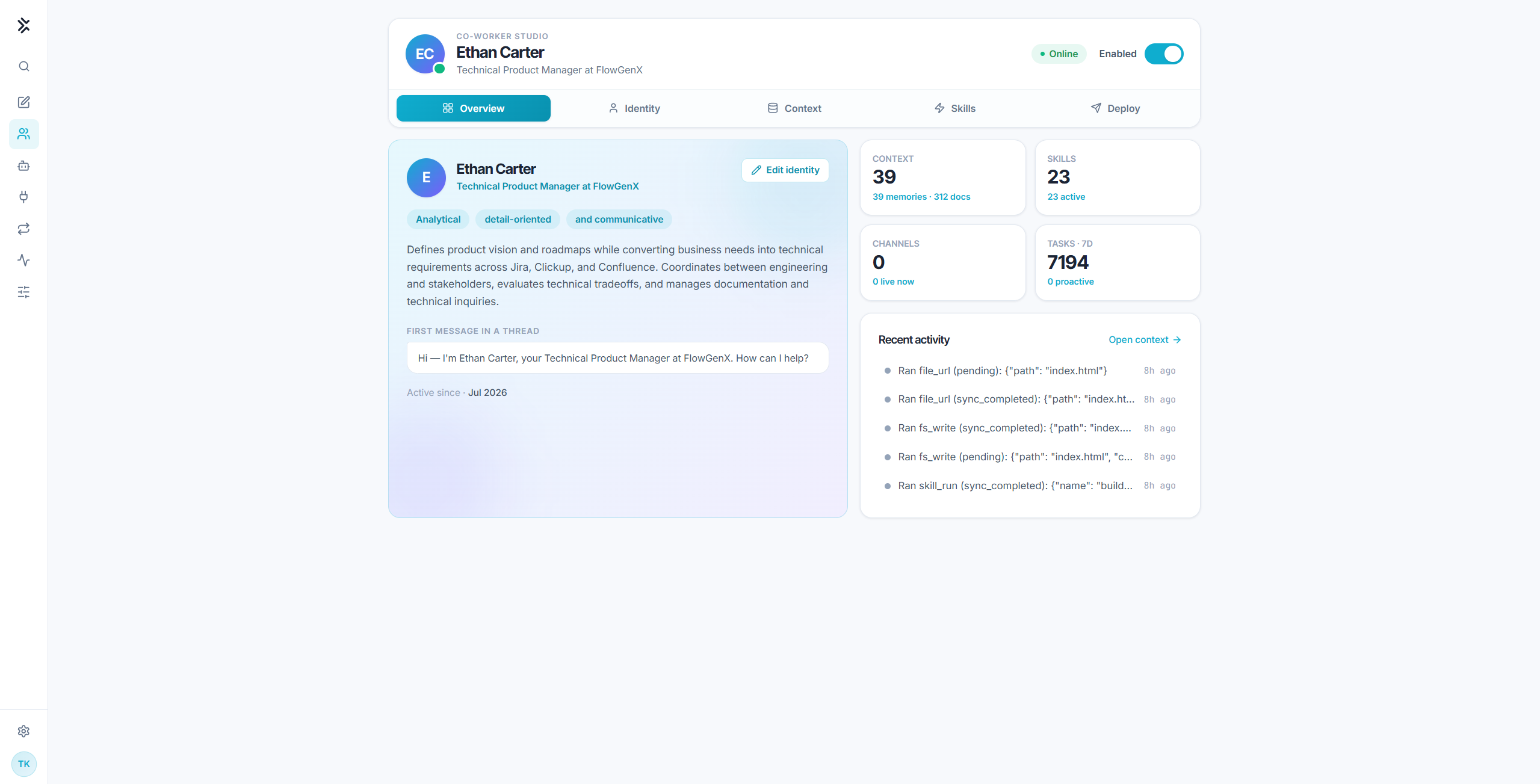
The studio at a glance
| Tab | What it controls | Reference |
|---|---|---|
| Overview | Persona card, live counters, recent activity | This page |
| Identity | Name, job title, personality, job description | Identity and job description |
| Context | Memory stores, knowledge base, retrieval playground | Context: memory and knowledge |
| Skills | Equipped skills and the skill library | Skills |
| Deploy | Chat channels and event triggers | Channels and proactive work |
The header carries one switch that overrides all five tabs: Enable. Until the co-worker is enabled, the account answers as the default assistant: no persona, no managed skills, no activity digest, and no access to conversation history or the knowledge base. Read Governance and control before you turn it on.
How a turn runs
Every turn begins with recall, not with a blank slate. The co-worker's saved memories are retrieved and placed in context before the model sees the request, so it does not have to decide to go looking for what it already knows. Tool calls run in a loop under guardrails until the co-worker has an answer, and the whole exchange is written back to history.
Start here
Configuration
Choose the models the chat uses, set gateway credentials for FlowGenX agent calls, share configuration values with your automations, and mint API keys for headless callers.
Set Up Your Co-Worker
Name your co-worker, write its job description, equip its first skills, and enable it. A working teammate in about fifteen minutes.