

Channels & Proactive Work
Reach your co-worker from Slack and Google Chat, keep thread continuity across turns, and let it act on events and schedules when nobody is watching.
A co-worker that only exists in one tab is a tool you have to remember to open. The point of the channel surface is that colleagues reach it where they already are, and that it can act without being asked first.
The Deploy tab
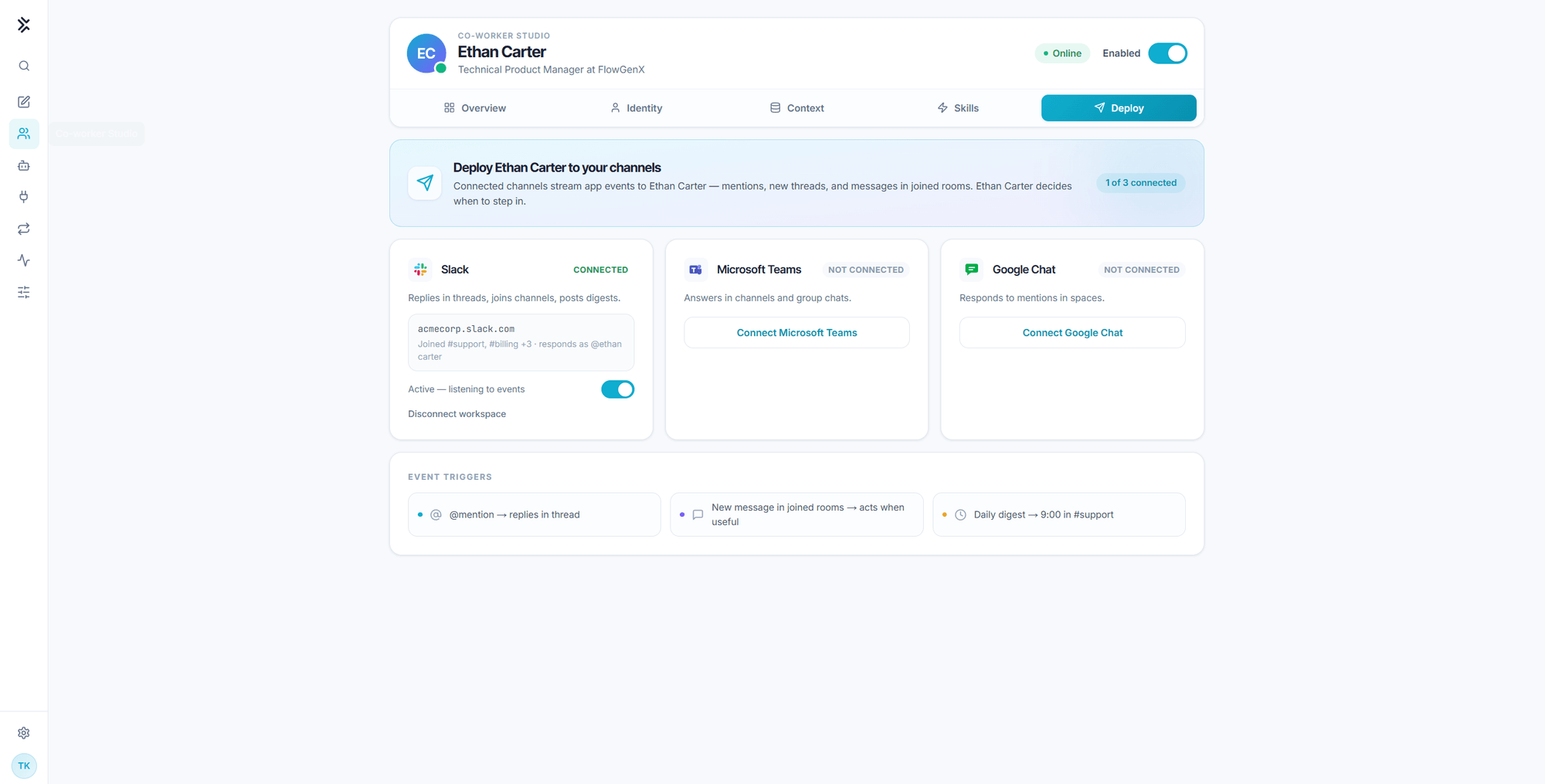
The Deploy tab is the channel configuration surface. It shows which chat platforms the co-worker is present on, which rooms it has joined, the handle it responds as, and the event triggers that decide when it steps in.
The Event triggers strip along the bottom names the three shapes of channel work:
| Trigger | Behavior |
|---|---|
| @mention | Replies in the thread it was mentioned in |
| New message in joined rooms | Reads what arrives and acts when useful |
| Scheduled digest | Posts on its own clock, for example daily at 9:00 in a support channel |
The second one is the one worth pausing on. The co-worker is not restricted to answering direct mentions. In rooms it has joined it sees the traffic and decides for itself whether a message is its business.
Preview limitation. In the current preview, connecting a workspace from the Deploy tab does not perform a live OAuth handshake. Channel delivery runs through an App Event Trigger and a workflow, described below. Treat the Deploy tab as the configuration model rather than the connection mechanism.
How a channel message reaches the co-worker
- An App Event Trigger subscribes to the messages you care about in Slack or Google Chat.
- A Flux Agent node passes the message to the co-worker and waits for the turn to finish.
- Downstream nodes post the answer back into the originating thread.
Because the trigger and the reply are ordinary workflow nodes, everything else on the canvas is available: route by room, filter by keyword, require an approval step before a reply goes out, or fan the same answer to two destinations.
Configuring the Flux Agent node
The node has four configuration groups.
Connection. A personal Flux API key. This is the single most important field on the node, because the run executes as the key's owner, which means it runs as that person's co-worker, with their identity, their memory, their skills, and their connections. There is no shared service key.
Task. Two fields:
| Field | Purpose |
|---|---|
| Task message | What you want done. Bind it from the trigger, or compose it from upstream node output |
| Conversation key | The stable id of the external conversation, such as a Slack channel or a Google Chat space or thread |
The conversation key is what gives a channel a memory. The same key resolves to the same session, so a follow-up message lands in the same conversation the co-worker was already having rather than starting cold. Bind it from the trigger, for example {{ ["trigger"].output.channel }}.
Mode. Auto runs straight through. Plan produces a plan first.
Options. Timeout, retry on failure, and maximum retries. Co-worker turns that involve many tool calls or sub-agents can run for minutes, so the default timeout is generous.
What the node returns
| Output | Contents |
|---|---|
run_id | The coordinator run id |
status | queued, running, input-required, completed, or failed |
response | The final answer text |
artifacts | Files the turn produced, each with a name, a kind, and a fetchable URL |
error | Populated when status is failed |
session_id | The session the conversation key resolved to |
tool_calls | How many tool calls the turn used |
Reference them downstream the usual way, for example {{ ["nodeId"].output.response }} or {{ ["nodeId"].output.artifacts[0].url }}.
Artifacts are structured, not just links. When a turn produces a chart, a deck, or a data file, it comes back as a list with a public URL per file as well as inside the answer text. Use the list to build a proper file card or image attachment in Slack or Google Chat instead of parsing URLs out of prose.
What changes when nobody is watching
A run started by a workflow is headless. Nobody is present to answer a clarifying question, and the co-worker is told so explicitly. Three behaviors follow.
- It never asks. The option to stop and check is closed. It proceeds on its best judgment and returns a final answer.
- It addresses only the latest message. With channel continuity, the same session accumulates turns. A headless run will not resurrect an unfinished task from earlier in the thread unless the current message asks it to.
- It cannot author playbooks mid-run. Routine-management tools are dropped from unattended runs. A scheduled run executes a playbook, it does not rewrite one.
Design unattended work so that "best judgment" is an acceptable outcome. If a task genuinely needs a human decision, put a human-in-the-loop node in the workflow around the co-worker rather than hoping the co-worker will stop and ask, because in a headless run it will not.
Proactive patterns
| Pattern | How to build it |
|---|---|
| Daily digest | A Scheduler Trigger into a Flux Agent node, with the answer posted to a channel |
| Answer on mention | An App Event Trigger filtered to mentions, with the conversation key bound to the thread |
| Watch and report | Ask the co-worker in chat to watch a condition. It checks in the background and continues the conversation when the condition becomes true |
| Escalate on a signal | An App Event Trigger plus a router node, so only messages that match your criteria reach the co-worker at all |
The last one is worth defaulting to. Filtering at the trigger is cheaper and more predictable than asking the co-worker to decide whether every message in a busy channel deserves its attention.
Attribution in a channel
Messages the co-worker posts carry its name, so a thread reads as a conversation with a named teammate rather than output from an integration. Colleagues reply to it by name, and those replies become part of the same session.
That is a feature with a governance edge: what appears in the channel under a co-worker's name was produced under a specific person's account and credentials. Keep the two aligned. See Governance and control.
Tools & Connected Systems
The built-in capabilities every co-worker carries, the connected apps and MCP servers it reaches through, and how sensitive actions are approved.
Governance & Control
What the enable switch actually gates, how the co-worker's scope is bounded, the guardrails that stop a runaway tool loop, and where to audit what it did.