

Identity & Job Description
The four fields that decide who your co-worker is, how it sounds, and what work it takes on. Edit them directly or shape them by chatting with the Identity studio.
Identity is the first tab for a reason. A co-worker with no job description is a general assistant with a name badge. The four fields on this tab are what turn it into a specific teammate with a specific remit.
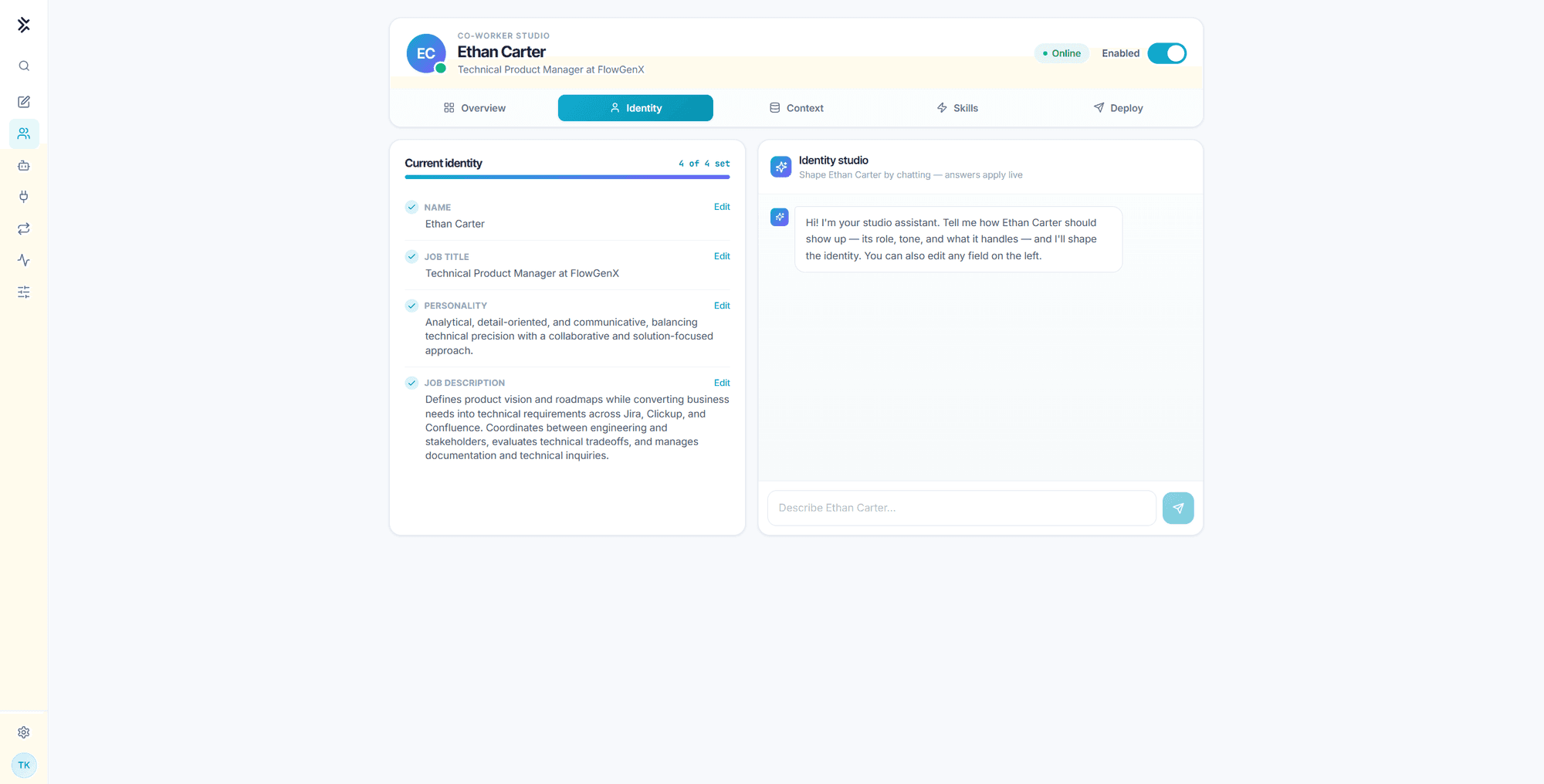
The four fields
| Field | What it is | What it drives |
|---|---|---|
| Name | The co-worker's human name | The author name on every message it posts, and how colleagues address it |
| Job title | Its role, written as you would write a real one | Its self-description, and the skills the library recommends |
| Personality | Two or three traits describing how it should sound | Tone across every channel, and the trait chips on the Overview tab |
| Job description | What it owns, decides, and hands back | What it picks up when a request is ambiguous, and what it declines |
The header of the checklist tracks completeness as N of 4 set. Nothing forces you to fill all four, but a co-worker missing its job description falls back on generic assistant behavior in exactly the moments where you wanted judgment.
Writing the job description
This is the field that does the most work, and the one most often written too thin.
A weak job description names a topic:
Helps with product management.A strong one names systems, decisions, and boundaries:
Defines product vision and roadmaps while converting business needs into
technical requirements across Jira, ClickUp, and Confluence. Coordinates
between engineering and stakeholders, evaluates technical tradeoffs, and
manages documentation and technical inquiries.
The difference shows up when a request is ambiguous. Asked "can you look at the pipeline?", the first version guesses. The second knows that a delivery pipeline is its business and a sales pipeline is not.
The job description steers, it does not enforce. It shapes what the co-worker chooses to do, but it is not a permission boundary. What the co-worker can actually reach is decided by its equipped skills, the tools it is offered, and the connected apps on the account. Write the job description to guide judgment, and use skills and connections to set hard limits. See Governance and control.
Personality
Personality is prose, but the Overview tab reads it as a list. It splits on commas and periods and renders the first few short phrases as trait chips, so a comma-separated opening line displays best:
Analytical, detail-oriented, and communicative, balancing technical precision
with a collaborative and solution-focused approach.
That renders as Analytical, detail-oriented, and and communicative chips on the Overview card, with the full text still driving tone.
Keep it to how the co-worker communicates. Anything about what it does belongs in the job description.
Editing with the Identity studio
The panel on the right of the Identity tab is a chat that writes the fields for you. Describe the role in your own words, for example:
She runs our monthly close. She should chase missing invoices, reconcile
against the ledger, and escalate anything over ten thousand dollars instead of
deciding it herself. Direct, no filler.
The studio drafts name, title, personality, and job description from that, and the answers apply live to the checklist on the left. You can still edit any field by hand afterwards. Edit on a field opens it inline, and saving updates the co-worker immediately.
The first message in a thread
The Overview tab shows the greeting the co-worker opens a thread with:
Hi, I'm Ethan Carter, your Technical Product Manager at FlowGenX. How can I help?This line is derived from the name and job title rather than authored separately. Changing either field changes the greeting.
Changing identity later
Identity edits take effect on the next turn. There is no rebuild and no redeploy.
Renaming or re-scoping a co-worker does not reset its memory. Memory, skills, and history belong to the account, not to the persona, so a co-worker that changes job title still remembers everything it learned under the old one. If that is not what you want, review the Context tab and ask the co-worker to correct or delete the memories that no longer apply. Do not expect the rename to clear them.
Identity only applies while the co-worker is enabled. With the header switch off, the account answers as the default assistant regardless of what is saved here. See Governance and control.
Set Up Your Co-Worker
Name your co-worker, write its job description, equip its first skills, and enable it. A working teammate in about fifteen minutes.
Context: Memory & Knowledge
The four memory stores a co-worker keeps, the read-only knowledge base it retrieves from, and the playground that shows you which source produced which answer.