

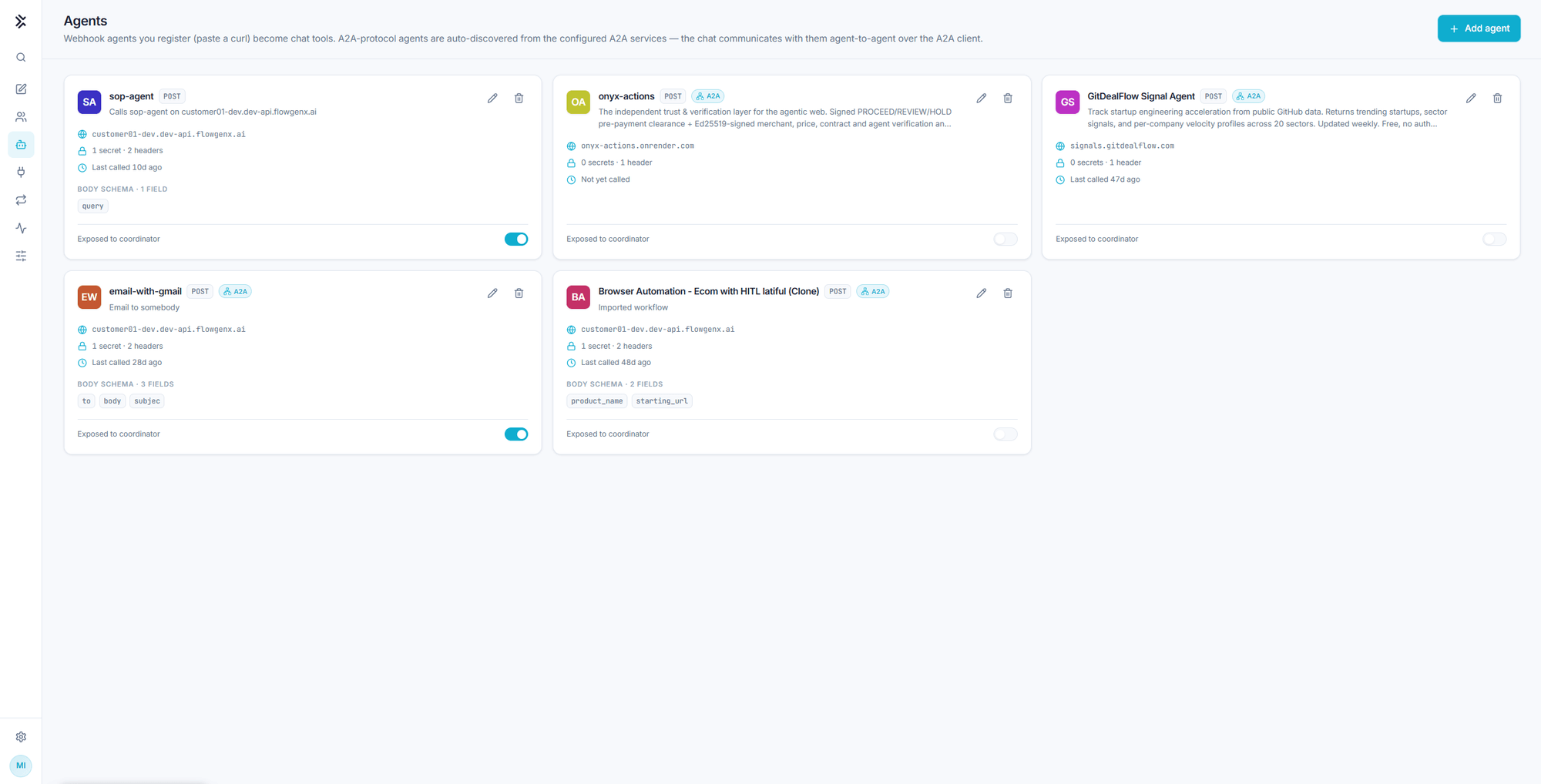
Agents
Register a webhook agent by pasting a curl command, or pick one from the Agent Registry. Registered agents become tools Flux can call, and you can mention them by name.
Agents extend what Flux can do with capabilities you own. Two kinds appear on this page:
- Webhook agents. Anything callable over HTTP. You register it by pasting a curl command and it becomes a chat tool.
- A2A-protocol agents. Discovered automatically from the configured A2A services, and reached agent-to-agent over the A2A client.
Registering an agent
Add agent opens a dialog with two tabs: pick from the Agent Registry, or paste a Curl webhook.
From the Agent Registry
Agents published to Agent Fabric appear here. Search by name, capability, or publisher, tick the ones you want, and press Done.
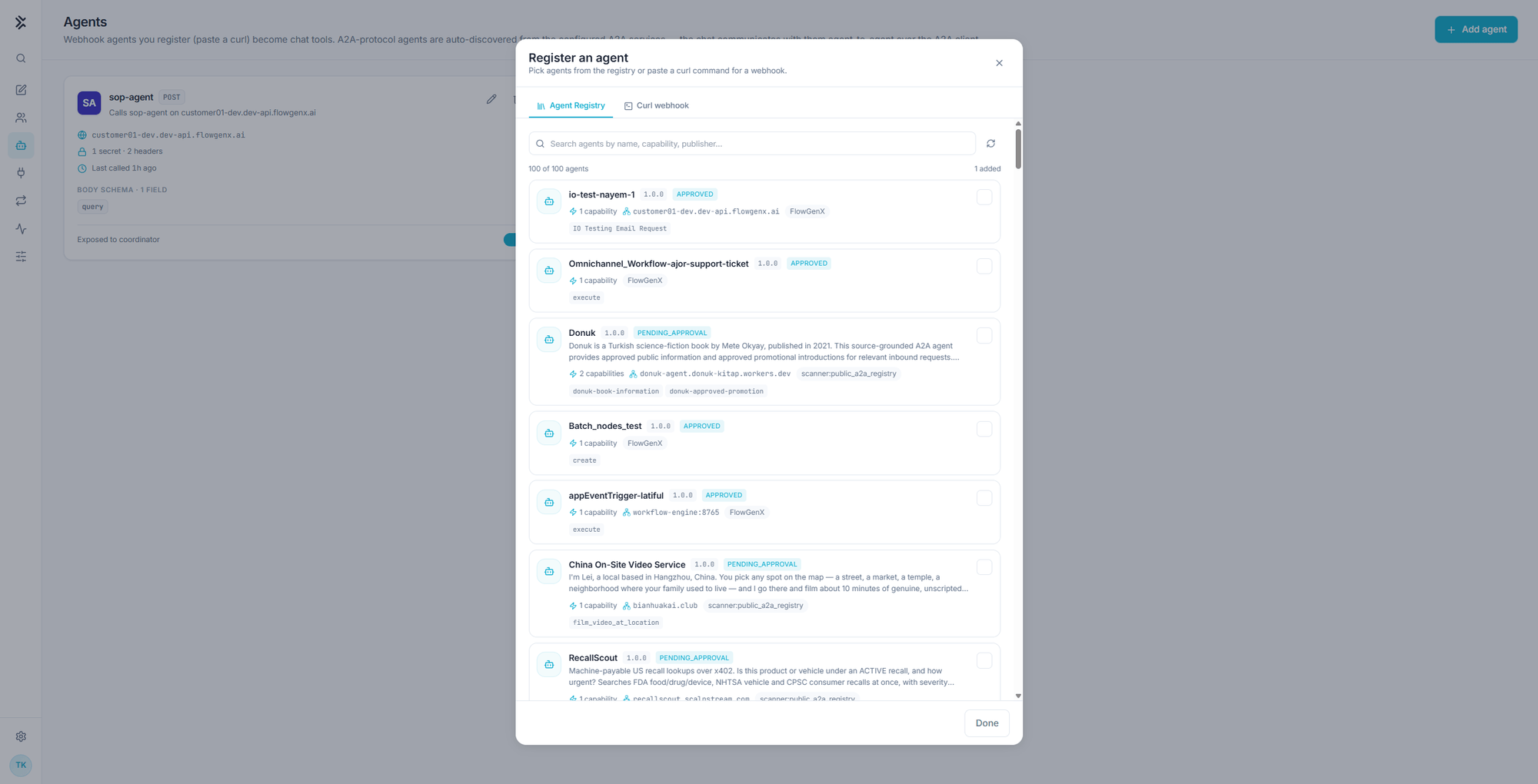
Each row tells you enough to choose without leaving the dialog:
| On the row | Meaning |
|---|---|
| Name and version | Which agent, and which published version |
| Approved / Pending approval | Its governance state in the registry |
| N capabilities | How many distinct things it exposes |
| Host | Where calls go |
| Publisher | Who published it, for example your own organization or a public A2A registry |
| Capability chips | The named capabilities, for example execute or film_video_at_location |
Read the publisher and the approval state. A registry can carry agents scanned from public A2A directories alongside your own. An agent marked pending approval has not been through your governance process, and adding it here gives the coordinator a route to a third party's endpoint.
Imported agents are labelled Imported from the Agent Registry on their card, and Refresh registry re-reads the list after someone publishes a new one. If the registry is empty, nothing has been registered in Agent Fabric yet, which is a platform-side task rather than a chat-side one.
From a curl command
The fast path for anything you host yourself. Paste a working call and the fields are parsed out of it.
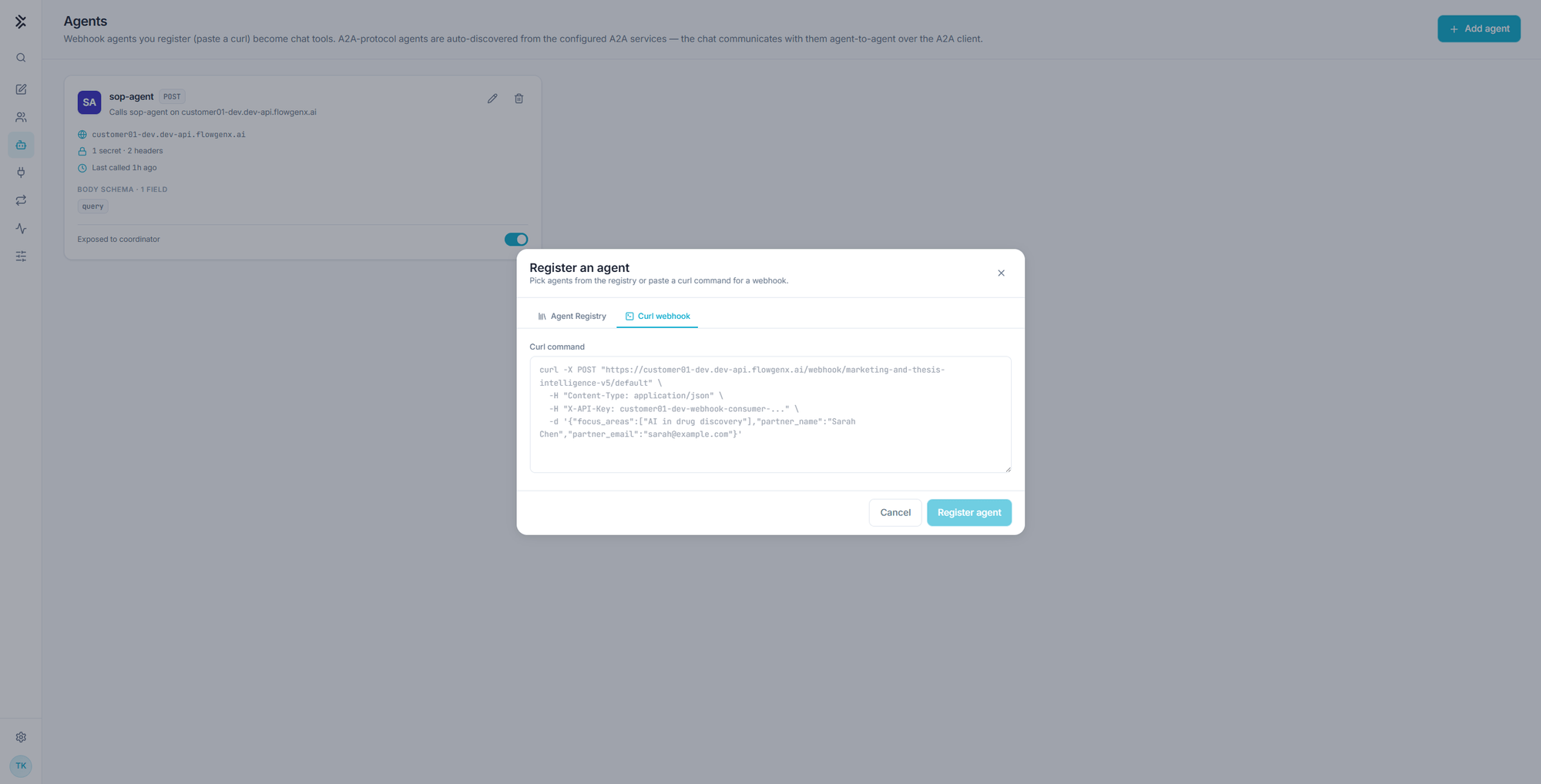
curl -X POST "https://your-service.example.com/webhook/marketing-thesis/default" \
  -H "Content-Type: application/json" \
  -H "X-API-Key: <token>" \
  -d '{"focus_areas":["AI in drug discovery"],"partner_name":"Acme Labs"}'
From that it derives the method, the URL, the headers, which of them are secrets, and a body schema from the JSON keys. Press Register agent, then give it two things of your own:
| Field | Why it matters |
|---|---|
| Name | How you mention it in chat, for example @sop-agent |
| Description | What this agent does, surfaced to the coordinator |
The description is the routing signal. Flux decides whether to call an agent from its description alone, so write what it is for, not what it is built with. "Answers questions about standard operating procedures from the SOP corpus" gets called. "SOP microservice" does not.
What a card tells you
| On the card | Meaning |
|---|---|
| POST and A2A badges | How the agent is called |
| Host | Where the call goes |
| Secrets and headers count | How many header values are stored, and how many are secret |
| Last called | The last time Flux used it, or Not yet called |
| Body schema | The fields the agent expects, shown as chips |
| Exposed to coordinator | Whether Flux may call it at all |
Exposed to coordinator is the switch that matters. An agent can stay registered, with its credentials intact, while being invisible to the coordinator. Use it to park an agent you are not ready to let the model reach, rather than deleting and re-registering it later.
Editing an agent lets you rename it, update the description, or rotate header values. Last called is the field to check when cleaning up: an agent that has never been called either has a description the coordinator cannot route on, or is not needed.
Calling an agent from a chat
Two ways:
Let Flux choose. With the agent exposed and described well, Flux calls it when a request matches.
Call it directly. Type @ and the agent name:
@sop-agent what is sop?Either way the call appears in the transcript as a tool card with its status, arguments, and an expandable result, and Flux writes the final answer from what came back. The Monitor link on the card opens that execution's record. See Monitor.
Agents, MCP servers, or skills?
| Use | When |
|---|---|
| Agent | You own an HTTP endpoint or an A2A agent that already does the job |
| MCP server | The capability is exposed as MCP tools, often several related ones |
| Skill | The capability is a procedure over tools you already have, not a new endpoint |
The distinction is where the work happens. An agent runs somewhere else and returns a result. A skill is instructions Flux follows itself.
Knowledge Search
Semantic search across your organization's ingested documents, answered with ranked source matches and the exact passage highlighted on the original page.
MCP Servers
Connect external Model Context Protocol servers to the chat. Their tools become available to Flux, with per-tool approval and a visible card for every call.