

FlowGenX AI Teammate
FlowGenX AI Teammate has its own account in Slack, Microsoft Teams, Google Chat, and Discord. It remembers, asks before it acts, and reports back.
FlowGenX AI Teammate is a colleague with an account. It has a name, a job title and a job description. Your team @mentions it in the channels they already use, and it does the work in the thread: it looks things up, acts in your apps, asks for a yes before anything that writes, and posts the result where it was asked.
You set it up once in Teammate Studio, inside FlowGenX Chat. After that, nobody has to open another app to use it.
 Slack#sales0 of 3
 11
One Teammate, four chat apps. Pick a run to replay it. Names and figures are demo data.
The problem it solves
Every team has work that is small, repeatable and nobody's job. "Did anyone chase that invoice?" "Who owns the Q3 roadmap doc?" "Can someone file this in ClickUp?" Each one takes ten minutes, and together they take the week.
AI assistants have not fixed this, for three reasons.
| What goes wrong | What a Teammate does instead |
|---|---|
| The assistant lives in its own tab, so people forget to use it | It sits in Slack, Teams, Google Chat and Discord as a named member. You @mention it like anyone else |
| It answers the question but does not do the work | It acts in the apps you have connected: it updates the quote, opens the ticket, sends the reminder |
| It starts from zero every time | It remembers people, decisions and earlier runs, and it turns a job it finished into a skill it can repeat |
| You cannot trust it with anything that matters | Anything that writes waits for a yes in the thread, every run leaves a trace, and one switch pauses it everywhere |
Teammate, Chat, workflow or agent?
FlowGenX gives you four ways to put AI to work. They are not competing options, they stack.
| Workflow | Agent node | FlowGenX Chat | Teammate | |
|---|---|---|---|---|
| Shape of the work | A defined sequence of steps | One reasoning step inside a workflow | A conversation you drive | An open-ended role |
| Who starts it | A trigger you configure | The workflow that contains it | You, in the chat | A colleague, a schedule, an event, or itself |
| What it keeps between runs | Run state only | Nothing by default | Your conversations | Memory across every conversation and every channel |
| Identity | The workflow's name | The node's name | Your assistant | A name, a title, a job description, its own account |
| Where you meet it | The canvas and run logs | Inside a workflow | The FlowGenX Chat app | Slack, Teams, Google Chat, Discord, email, and FlowGenX Chat |
| Best for | Deterministic, repeatable processes | Classification, extraction, drafting | Work you do yourself, faster | Work you want to hand to someone |
A Teammate is the right choice when the request arrives as a sentence rather than a payload. "Find every stalled deal in EMEA and tell me who owns it" is a Teammate job. "Every time a Zendesk ticket is created, classify it and reply" is a workflow.
What makes it a teammate
It shows up where the team works
One Teammate in Slack, Microsoft Teams, Google Chat and Discord at once, connected from one page in a few minutes each.
It asks before it acts
Anything that writes waits for a yes in the thread. Approve once, always allow for the team, or deny. Answer now or three hours later.
It works on a schedule
Say "I want a routine" in any channel. It asks what, when and where, then reports back in the same thread every time it runs.
It remembers and learns
It keeps what it learns about your business, recalls what it has already done, and saves a job that worked as a skill.
It works inside your apps
Connected apps, any API you import, your own MCP servers, and your workflows and agents. More than 5,000 tools, called by name.
It stays under your control
Every tool on or off, Auto or Ask first. Sensitive data masked, every run traced, and one switch to pause every channel.
See it on real work in What teams hand to it.
One account, one Teammate
Each FlowGenX Chat account has exactly one Teammate. There is no list to manage. The first time you open Teammate Studio you choose a ready-made Teammate or start from a blank one.
This one-to-one binding matters for control: the Teammate acts through the account's own connections, so its reach is exactly the reach of the account that owns it. Give a role-shaped Teammate to a role-shaped account. A Finance Teammate belongs on an account that holds the finance connections and nothing else. See Governance and control.
The Studio at a glance
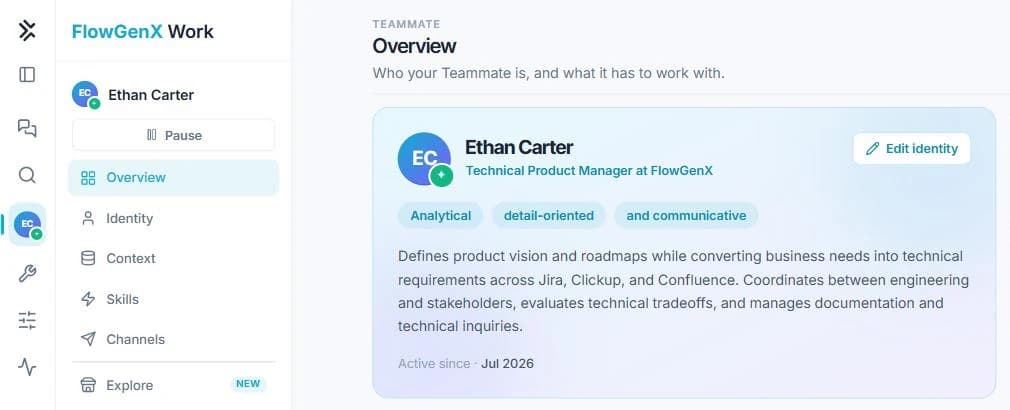
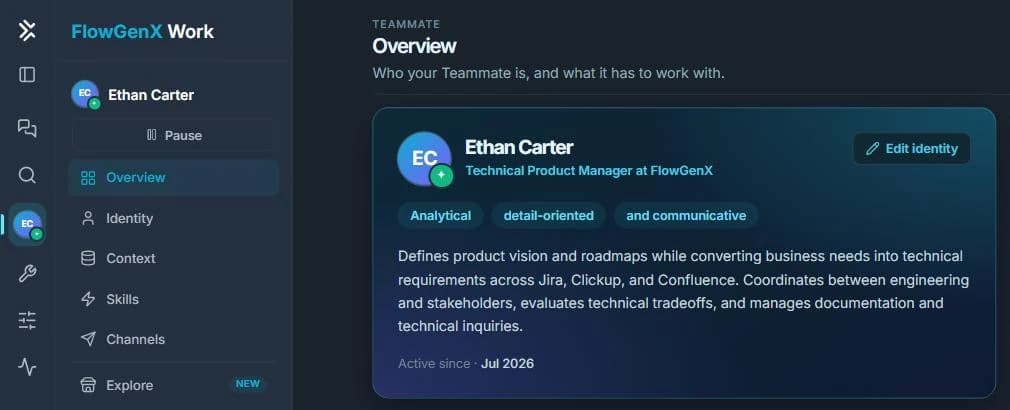
The Teammate has its own section in the FlowGenX Chat sidebar. The controls it shares with the rest of your account sit under Tools and Settings.
| Page | Where | What it controls | Reference |
|---|---|---|---|
| Overview | Teammate | Persona card, live counters, activity charts, recent runs | This page |
| Identity | Teammate | Name, job title, personality, job description | Ready-made Teammates |
| Context | Teammate | What it remembers, the knowledge it can look up, the retrieval playground | Memory and knowledge |
| Skills | Teammate | Equipped skills and the skill library | Skills |
| Channels | Teammate | Slack, Microsoft Teams, Google Chat and Discord | Channels |
| Explore | Teammate | The gallery of ready-made Teammates | Ready-made Teammates |
| Capabilities | Tools | Every tool on or off, Auto or Ask first, Ask mode | Governance and control |
| Guardrails | Settings | Masking rules for personal data and secrets | Governance and control |
| Routines | Tools | Scheduled and event-driven work | Routines |
One button at the top of the Teammate section overrides every page: Publish, which becomes Pause and Resume once the Teammate is live. Until it is published, the account answers as the default assistant, with no persona, no managed skills and no presence in your channels. Read Governance and control before you switch it on.
How a request runs
Every request begins with recall, not with a blank slate: what the Teammate already knows about the people, the business and its own earlier runs is in front of it before it starts. It then works through its tools until it has an answer. A step that only reads goes ahead. A step that writes stops and asks, and the run picks up exactly where it stopped once someone answers. The reply lands in the thread it was asked in, and the whole run is kept so you can open it later.
Start here
Set up your Teammate
Pick a role, connect a channel, set what it may do alone, and switch it on. About fifteen minutes.
What teams hand to it
Real jobs, from two CVs in Slack to a customer report in Discord, with what was asked and what came back.
Governance and control
What the Publish switch gates, how its reach is bounded, and where to audit what it did.
Configuration
FlowGenX Chat configuration: choose chat models, set gateway credentials for agent calls, share configuration values, and mint API keys for headless callers.
What Teams Hand to It
The jobs teams hand to a Teammate, from two CVs dropped in Slack to a customer report in Discord. What was asked, what it did, and what came back.