

Python Tools
Create custom MCP tools with AI-assisted Python function generation
Python Tools allow you to create custom MCP tools by writing Python functions. With AI-assisted code generation, you can describe what you want in natural language and have Claude generate the implementation for you.
AI-Powered Tool Creation
What Can Python Tools Do?
Python Tools are incredibly versatile. You can create tools that:
Data Processing
- Parse and transform data formats
- Calculate statistics and metrics
- Filter and aggregate datasets
Text Operations
- Extract information from text
- Format and template strings
- Validate input patterns
Calculations
- Mathematical computations
- Financial calculations
- Unit conversions
Business Logic
- Pricing calculations
- Eligibility checks
- Workflow decisions
Date & Time
- Date calculations
- Timezone conversions
- Schedule generation
Custom Integrations
- API wrapper functions
- Data validation logic
- Complex transformations
Step-by-Step Guide
Follow these steps to create a Python function tool:
Step 1: Select Python Function
1
Choose Python Function Tool Type
Open an existing MCP server (or create one using MCP Composer). Click Create New Tool and select "Python Function" to open the AI-assisted Python editor.
Step 2: Use AI to Generate Your Tool
2
Describe Your Tool to the AI Agent
The Python editor includes an embedded AI agent. Describe what you want in natural language, and the AI will generate:
- Complete Python function implementation with type hints
- Auto-generated input and output schemas
- Input validation and error handling
- Docstrings and inline documentation
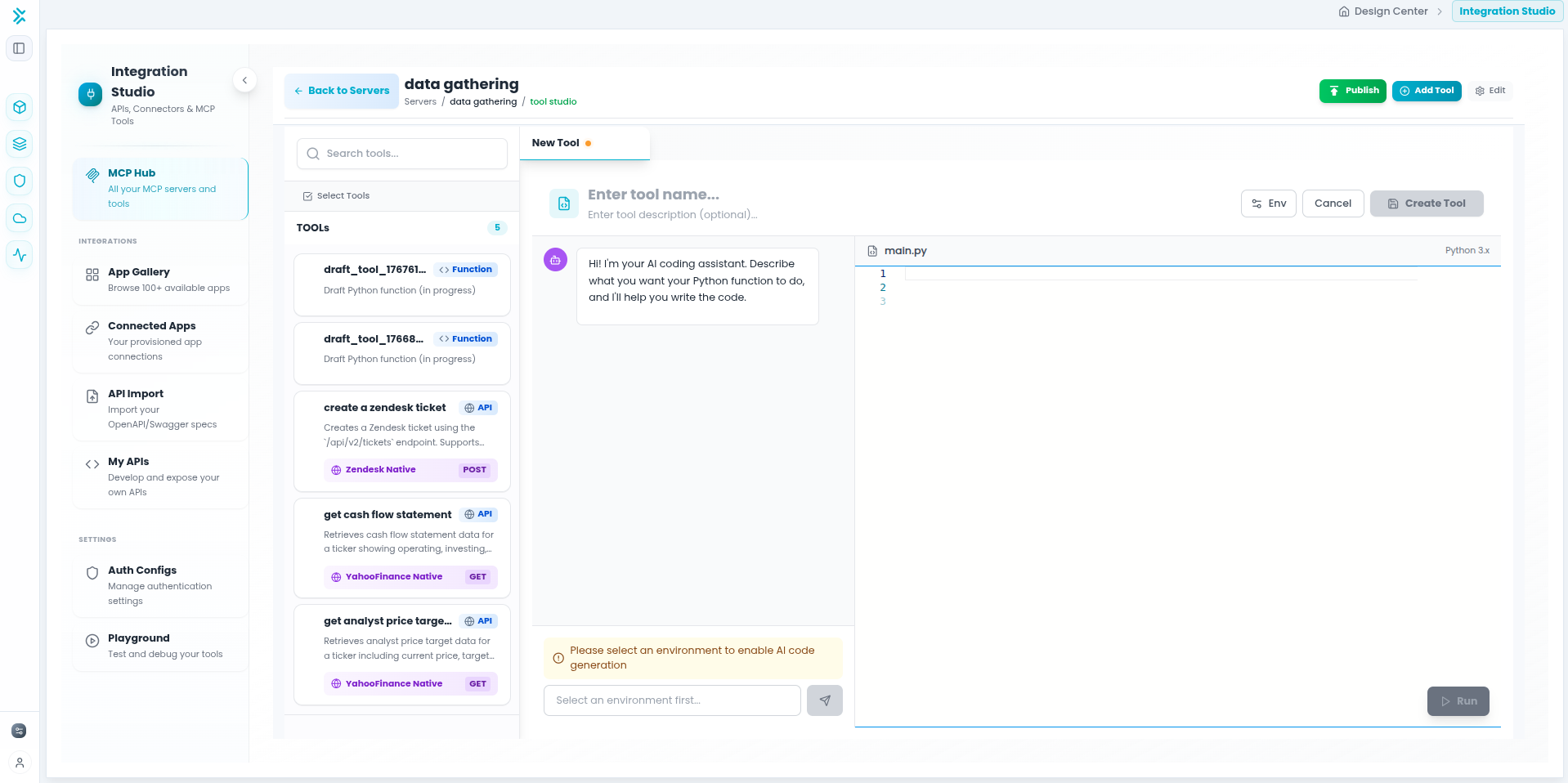
You can iterate with the AI agent to refine the code, add features, or fix issues. The agent understands context and can make targeted improvements to your function.
Step 3: Configure Environment Variables (Optional)
3
Add Environment Variables
If your Python function needs API keys, tokens, or configuration values, add environment variables that your code can access at runtime.
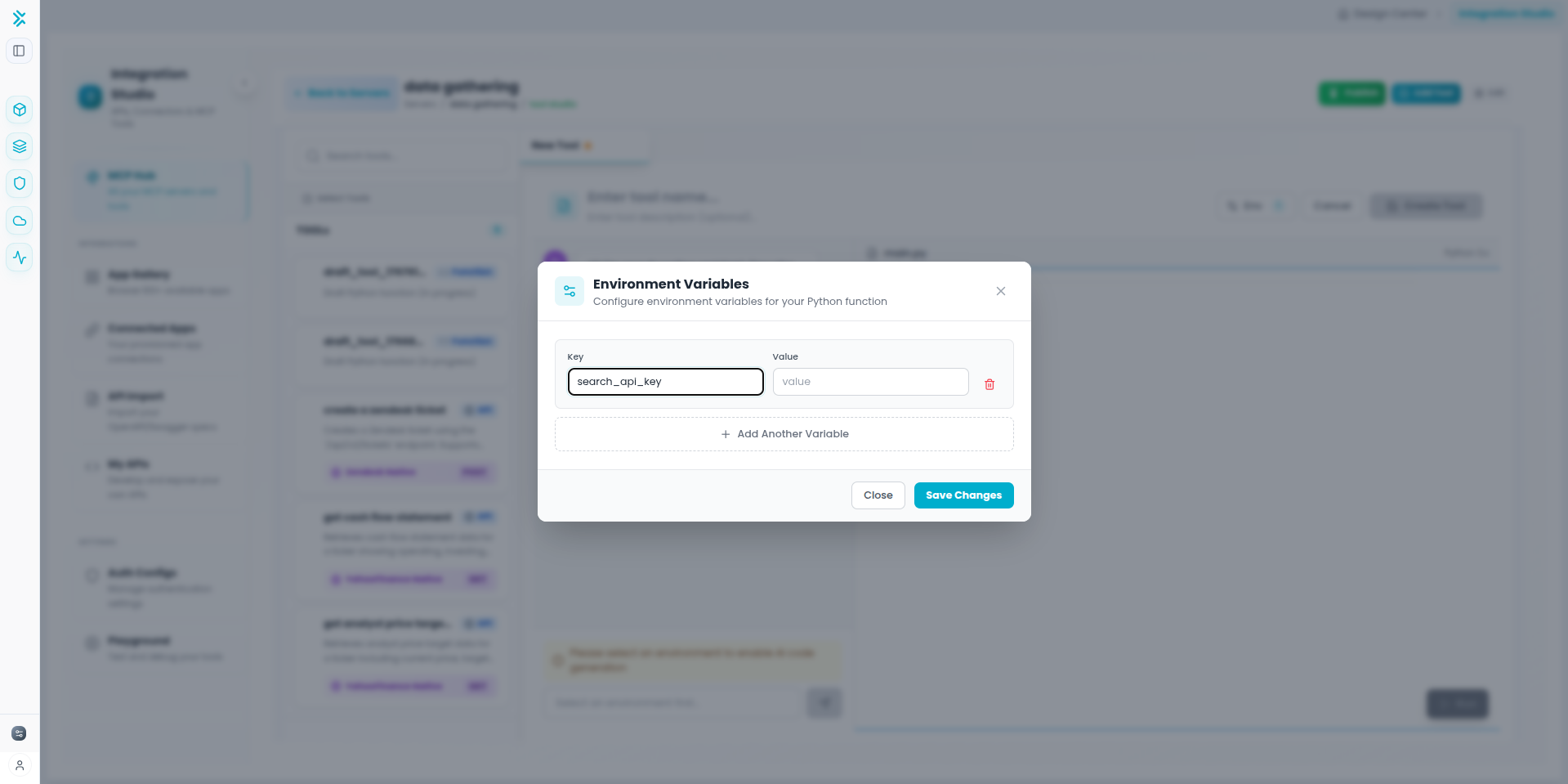
Security: Environment variables are stored securely and injected at runtime. Use them for sensitive data like API keys instead of hardcoding in your Python function.
Step 4: Test and Publish
4
Test and Make Available
- Use the built-in test interface with sample inputs
- Verify the output matches expectations
- Test edge cases (empty values, null, large numbers, etc.)
- Click Save when satisfied with the results
- Set status to Published to make available to agents
AI-Powered Features
Natural Language Input
Conversational Refinement
Automatic Schema Generation
Context-Aware Assistance
Example AI Prompts
Effective Prompts for the AI Agent
Pro Tip: Be specific about inputs, outputs, and edge cases. The more detail you provide, the better the generated code will be.
Best Practices
Building Effective Python Tools
- Be specific and detailed in your descriptions
- Explicitly request validation and error handling
- Ask for edge case handling upfront
- Iterate conversationally to refine the code
- Keep each function focused on one task
- Use descriptive names for tools and parameters
- Write clear descriptions for agent understanding
- Document return values and their meanings
Testing: Always test with edge cases—empty values, null inputs, extreme numbers, and invalid data types before publishing.