
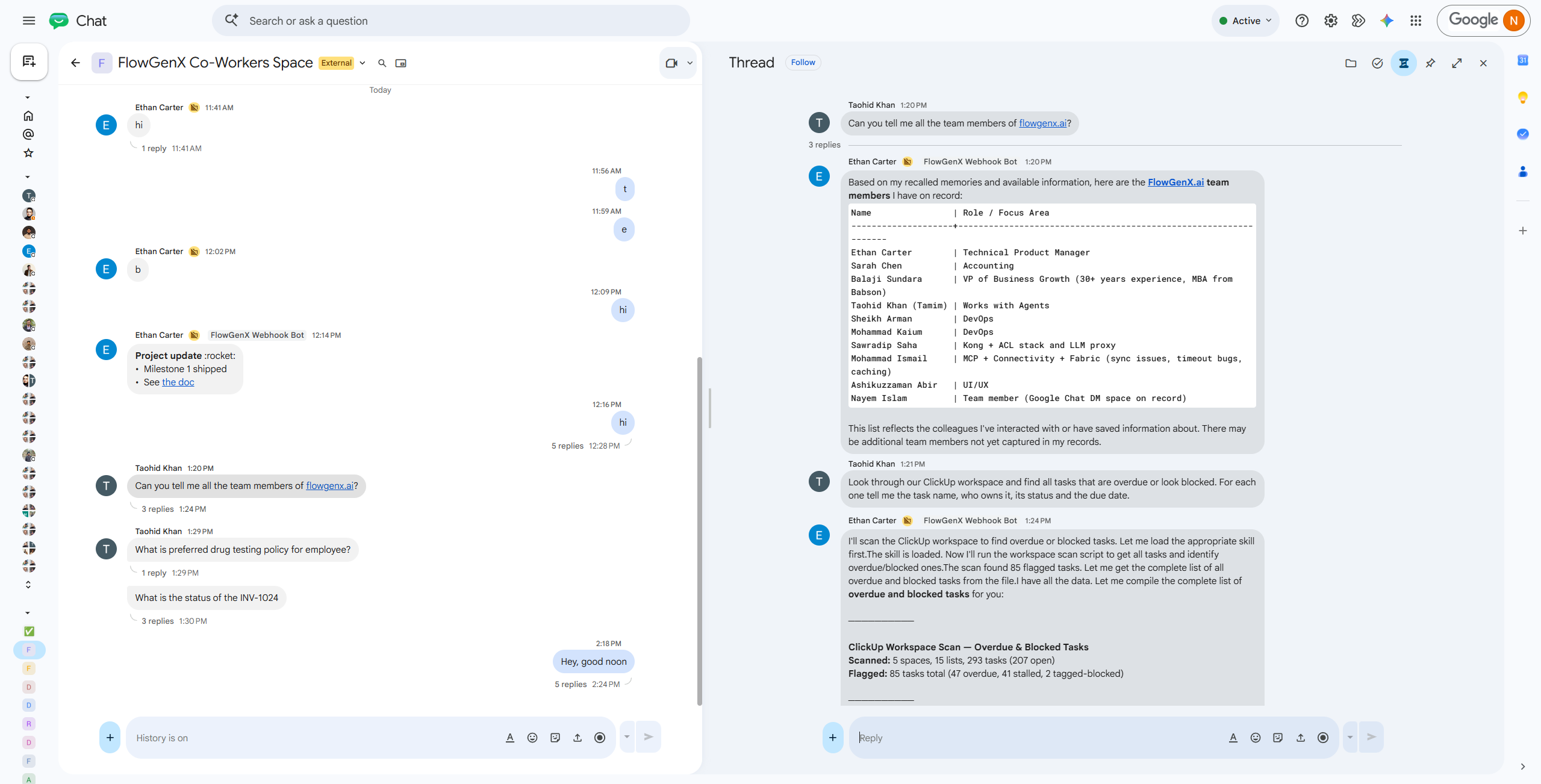
Someone on the team typed one sentence into Slack:
Tamim Khan · 1:27 PM
Look through our ClickUp workspace and find all tasks that are overdue or look blocked. For each one tell me the task name, who owns it, its status and the due date.
A few seconds later:
Ethan Carter · 1:28 PM
I'll scan the ClickUp workspace to find all overdue or blocked tasks. Let me load the appropriate skill first. The skill is loaded. Now I'll run the workspace scan script to get all tasks and identify overdue/blocked ones. The scan found 85 flagged tasks.
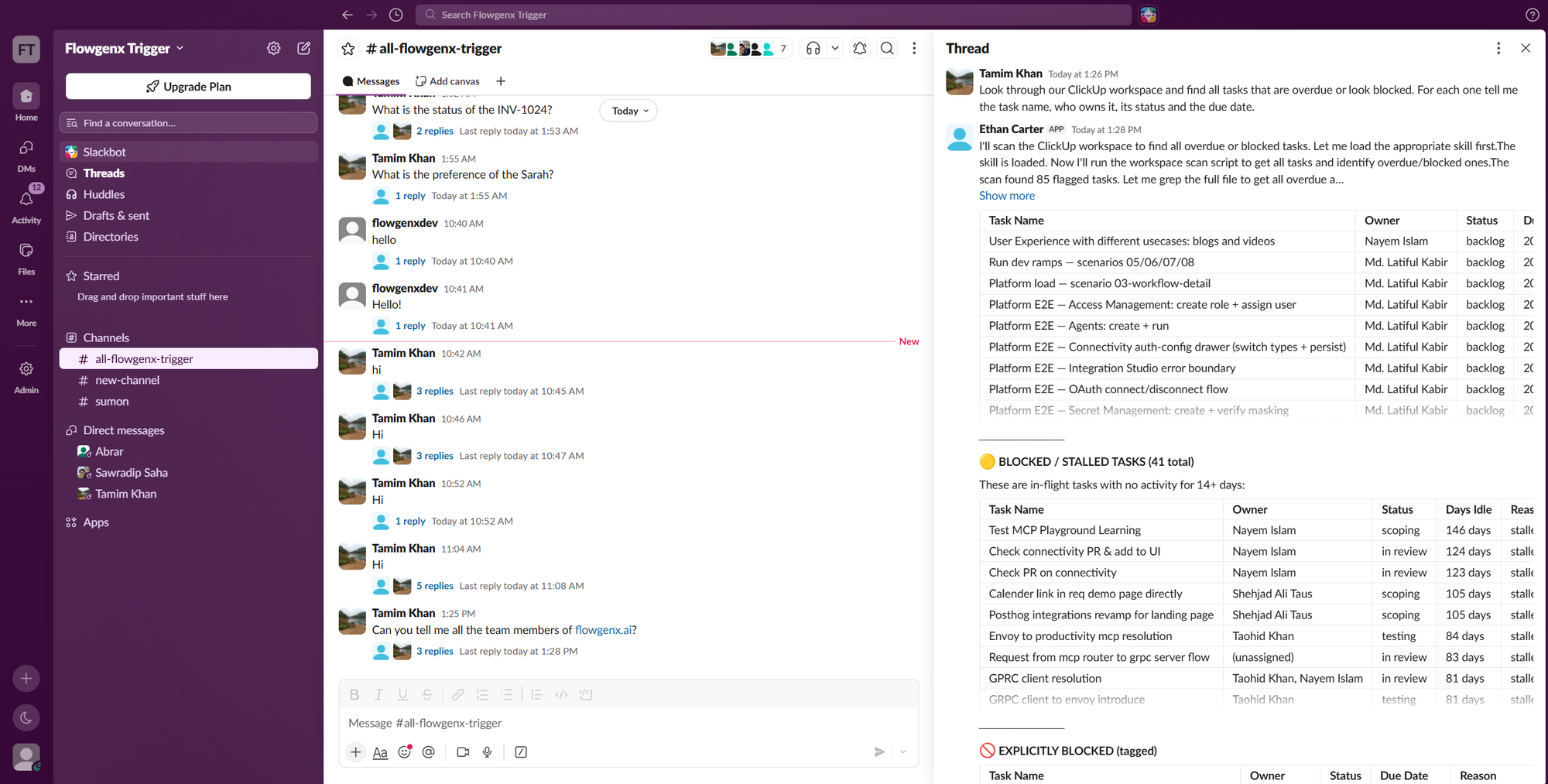
85 flagged. 41 of them still in flight with no activity for two weeks or more, each returned with an owner, a status and how long it had been sitting. The worst had been in "scoping" for 146 days. Nobody opened ClickUp, and nobody built a report.
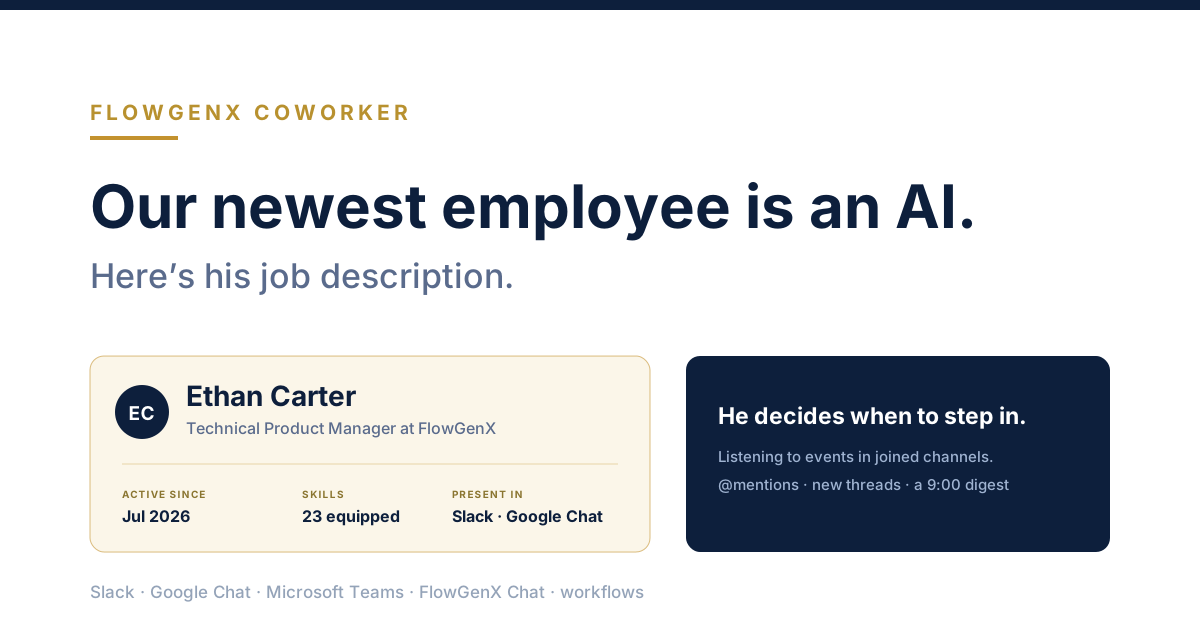
Ethan Carter is a Technical Product Manager at FlowGenX. He has a job title, a personality, a written job description, his own Slack handle, 23 skills, and delivery work that belongs to him rather than to whoever gets to it first.
Key Takeaways
- A coworker isn't an assistant with a name on it. It has its own credentials, its own permission scope, and its name on every action it takes.
- The job description isn't documentation. It's the configuration and the permission boundary, and it decides what he takes on and what he hands to someone else.
- He's in the channel before you ask. Connected channels stream events to him and he decides when to step in, including a scheduled digest nobody requests each morning.
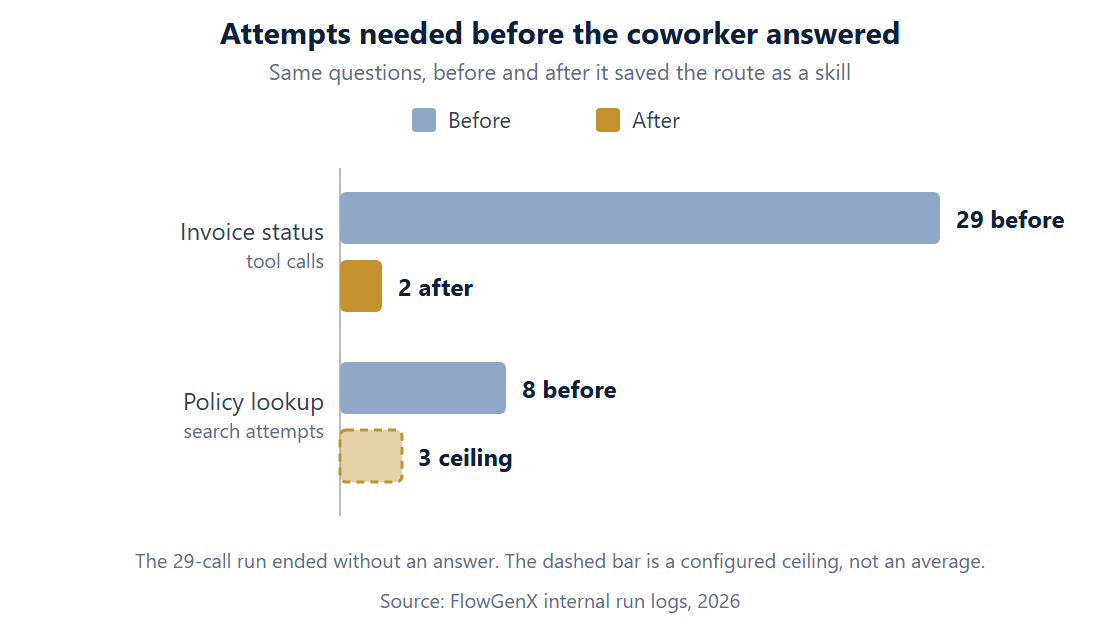
- He learns your systems. A route that once took 29 tool calls and produced no answer became a saved skill, and the next question of that shape resolved on the second call.
- You deploy one per role, not one for everything. An account that can reach your CRM, your ledger and your HR policies is an admin account with a personality.
An assistant waits. An employee has a job.
Most AI at work is shaped like a helper. You open it, you ask, it answers, you close it. Whatever it worked out evaporates. The next person who needs the same thing starts from nothing, and the twentieth version of that question costs exactly what the first one did.
An employee is shaped differently. An employee has a role and a scope. They're in the room before anyone asks. They know what happened last quarter. And when they do something, their name is on it, not yours.
| Assistant | Coworker | |
|---|---|---|
| Identity | Yours. It borrows your session and your permissions | Its own. Own credentials, own RBAC scope, own handle |
| Scope | Whatever you type into the box | A job description you wrote, and outcomes that are his |
| Presence | Exists when you open it | Sits in the channel, listening to events |
| Initiative | Waits to be asked | Decides when to step in |
| Memory | This thread | Procedural, semantic and episodic, plus full history |
| Output | A draft you finish | Finished work, files attached |
| Accountability | Your name on the action | His name on the action, with a replayable trace |
How he works: sense, decide, act, learn
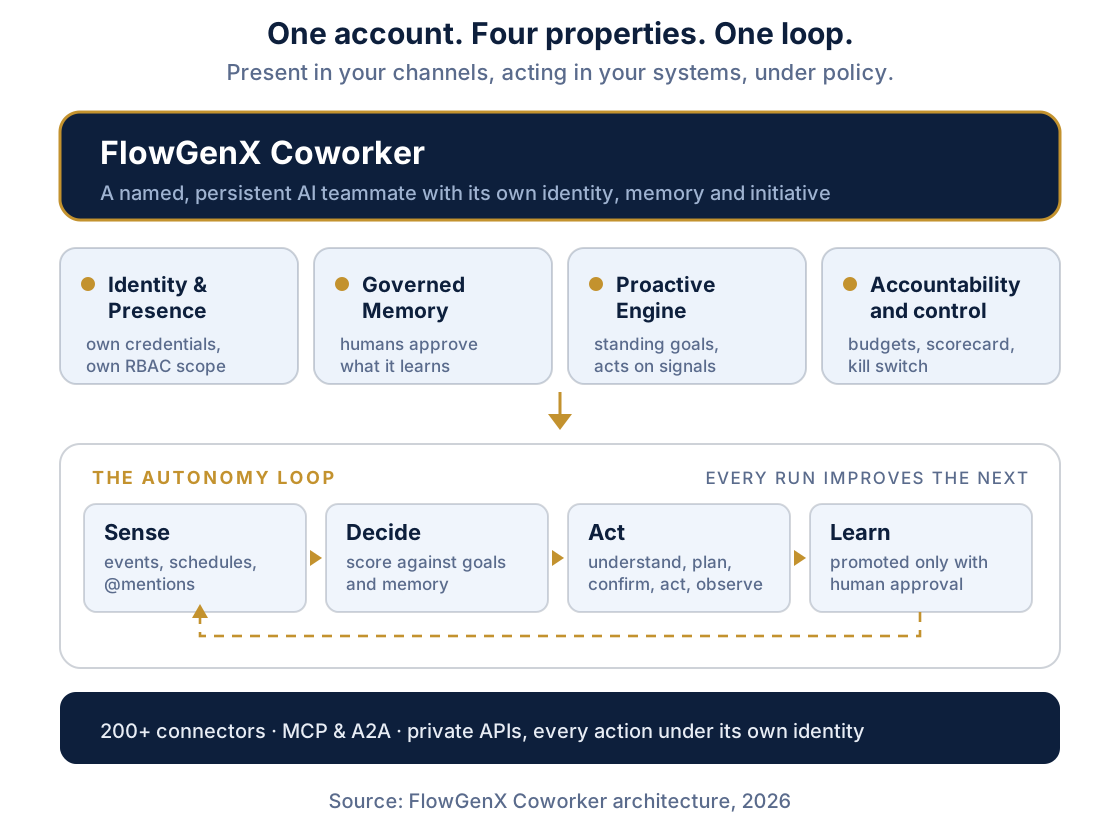
Sense is how work reaches him: schedules, mentions, new messages in rooms he's joined. Decide is the step most demos skip. He scores the signal against his goals and his memory and either takes it or escalates it, because a teammate who does everything asked of him is a script, not a colleague. Act is its own small loop: understand, plan, confirm, act, observe. Learn turns the run into something reusable.
His job description is the whole configuration
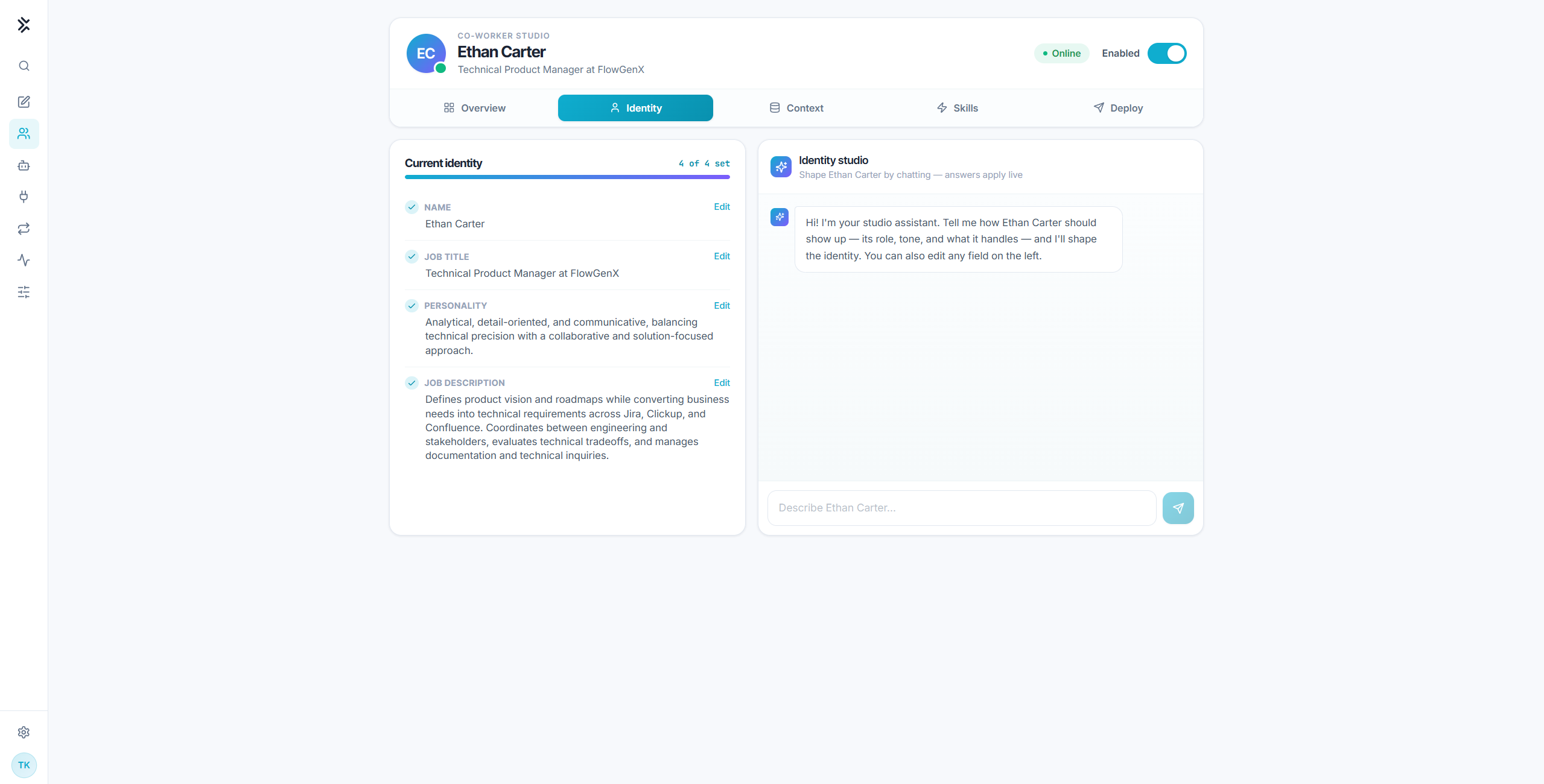
The job description reads:
Defines product vision and roadmaps while converting business needs into technical requirements across Jira, ClickUp, and Confluence. Coordinates between engineering and stakeholders, evaluates technical tradeoffs, and manages documentation and technical inquiries.
That paragraph isn't documentation about him. It is him. It decides which questions he takes, which he hands back, and which of his skills he reaches for first. Change the paragraph and you've changed the employee.
Read it for what it excludes, too. Ask Ethan why a release slipped and he owns the answer. Ask him which deals are stalling and you're asking a product manager to do RevOps. That work belongs to a different coworker, holding CRM credentials Ethan has no business holding. The job description isn't just a prompt. It's the permission boundary, and I'll come back to why that's the most important sentence in this post.
You can shape all four fields by talking to the Identity Studio, and answers apply live. Hiring him is an afternoon.
He lives where your team already lives
An employee you have to go and open is not an employee.
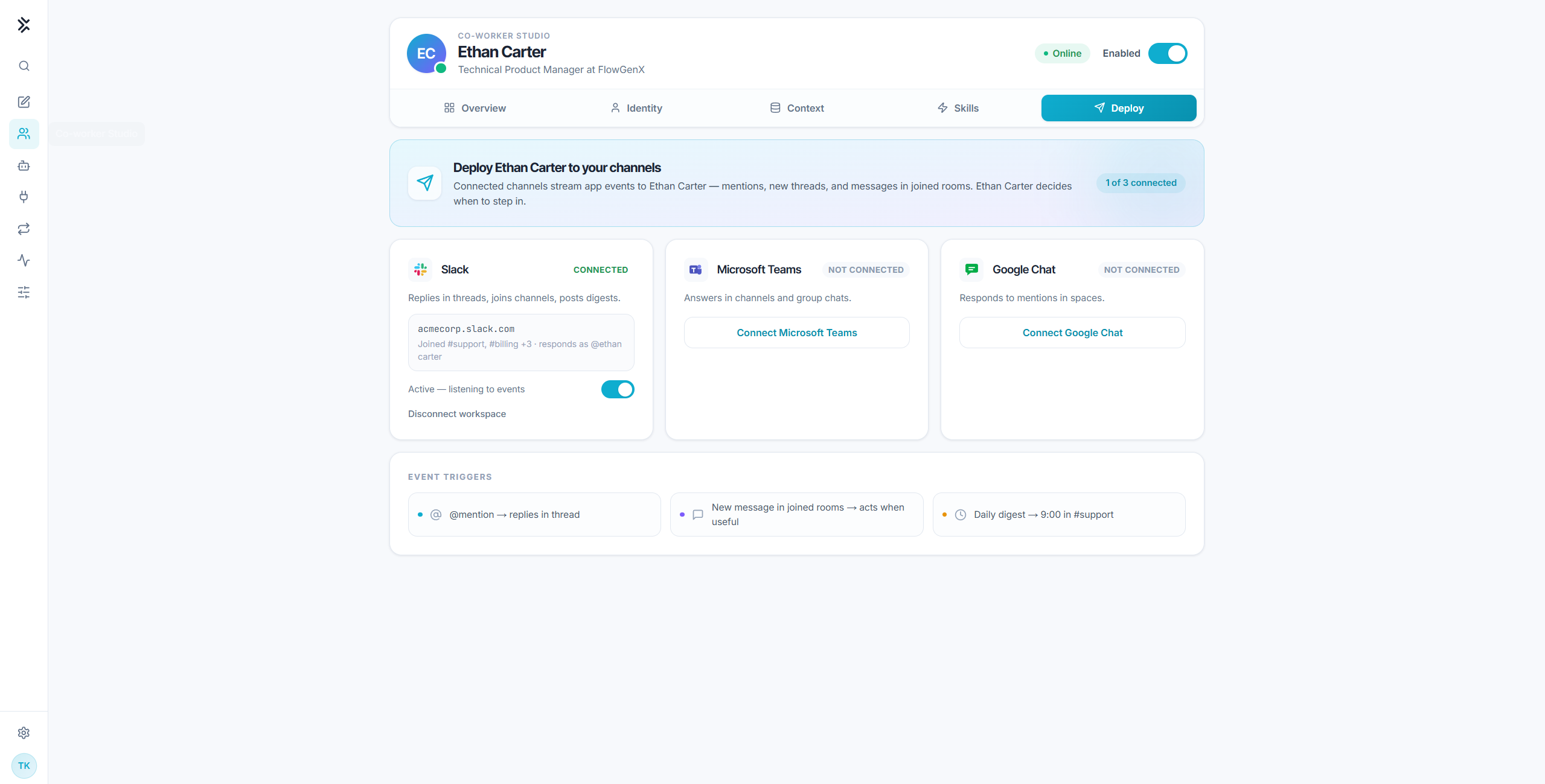
Look at the three event triggers along the bottom, and specifically the third one: a daily digest at 9:00. Nobody sends that request. It arrives because posting it is part of his job.
The second trigger matters just as much. A new message in a joined room means he acts when useful, which implies he often decides not to. An employee who answers every message in every channel is noise.
What a Technical Product Manager actually owns
Ethan's work is delivery work, and it looks like delivery work.
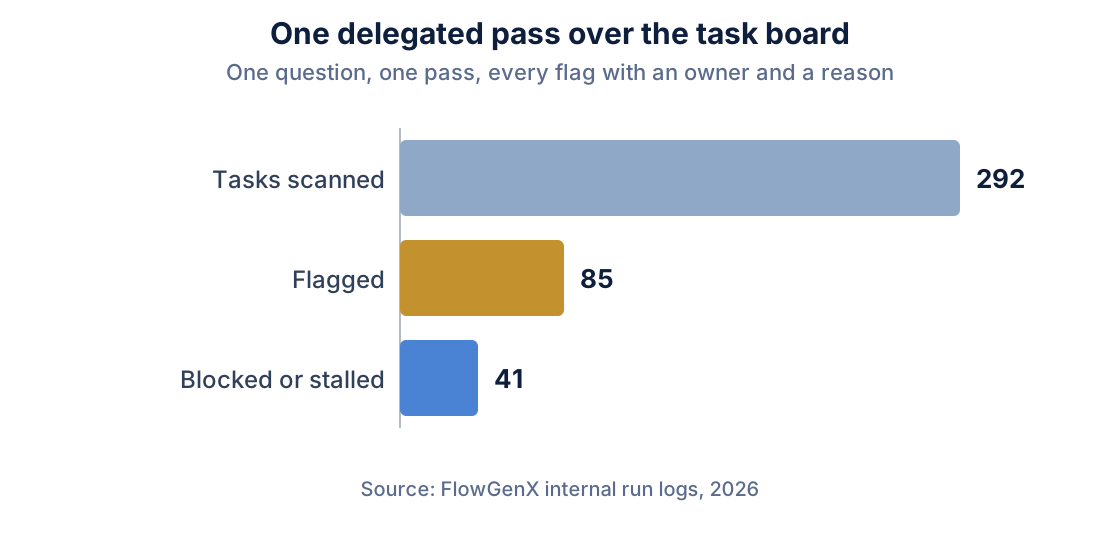
Ask him for the same thing as a document and you get the document. On one headless run he produced Task_Distribution_Report.pptx and clickup-tasks.tsv, built them in the sandbox, uploaded them, and handed both back as links in the channel. Most agent demos end at the answer. Real work ends at a file somebody can send.
The rest of his role is in his skill list, and it reads like a job posting: Sprint & Delivery Status Digest. Roadmap & Prioritization Review. Dependency & Risk Coordination. Requirement Intake & Clarification, which turns a raw feature ask from chat or a customer note into something an engineer can pick up. Release Notes & Launch Communication. User Stories & Acceptance Criteria. Technical Tradeoff Evaluation.
None of those needed a developer. They needed a colleague who already knew where things live.
He learns your business, and keeps what worked
Ethan has all required skills equipped, and the studio describes them accurately: he uses these autonomously.
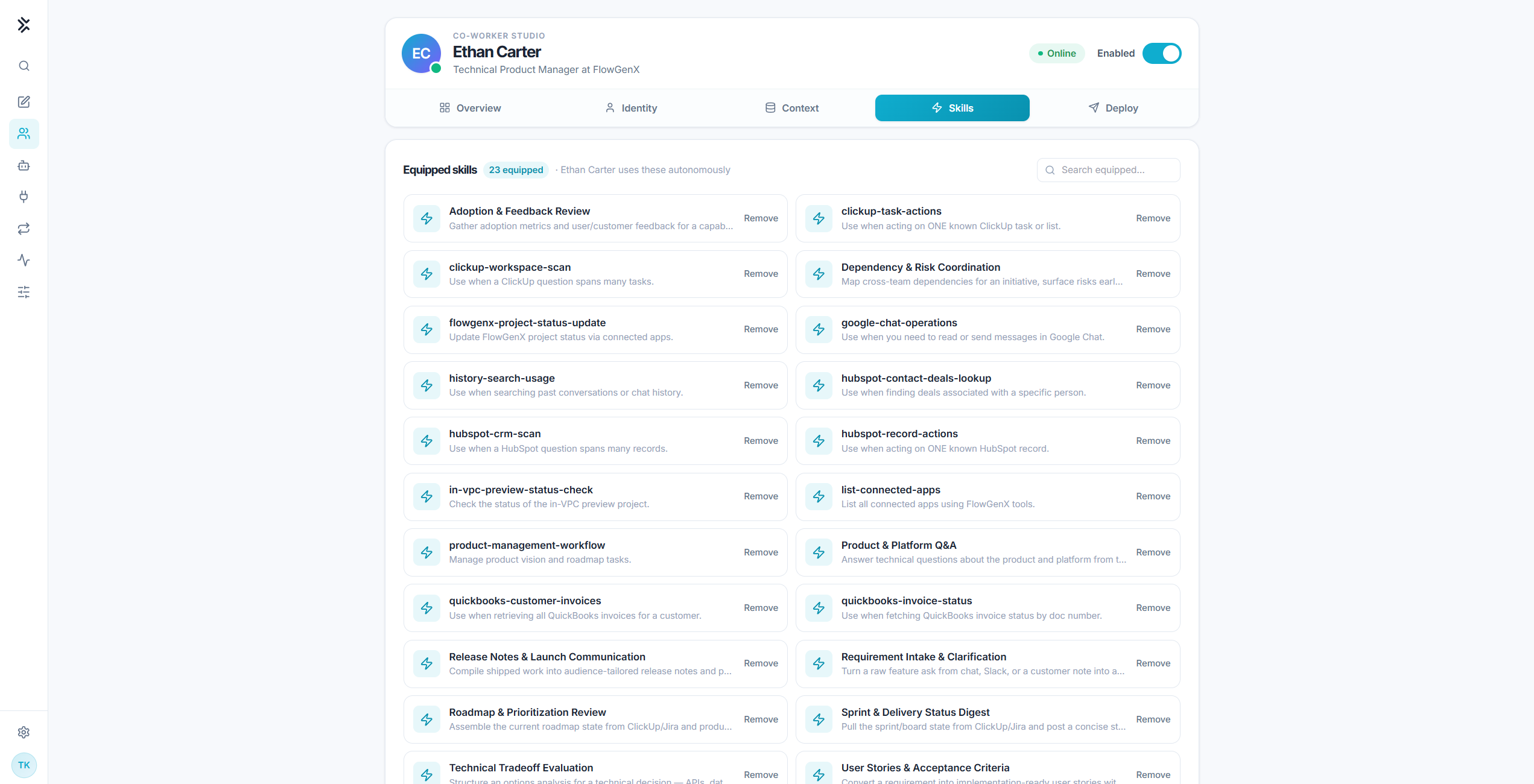
There are two kinds in that list. The Title Case ones came with the role, the way a playbook binder comes with a job. The lowercase ones are routes he worked out himself against our systems: clickup-workspace-scan for questions that span the whole board, clickup-task-actions for acting on one known task.
That first one is why the thread at the top of this post reads the way it does. "Let me load the appropriate skill first. The skill is loaded." That isn't narration. It's him picking up a runbook he wrote.
The sharpest measurement we have of that loop came from the finance side. Early on, a coworker spent 29 tool calls trying to answer a question about invoice status, wandered through eight approaches, and the run died without producing an answer. Genuinely bad. Then it wrote the route that eventually worked into a skill, with a name and a description, and the next question of that shape loaded it as tool call number two.
Coworkers find those runbooks by meaning rather than by wording, too. Somebody once asked about an "unpaid bill". Nothing in our system is called that. It's called an invoice. The right playbook came back anyway.
Four kinds of memory, and none of them self-graded
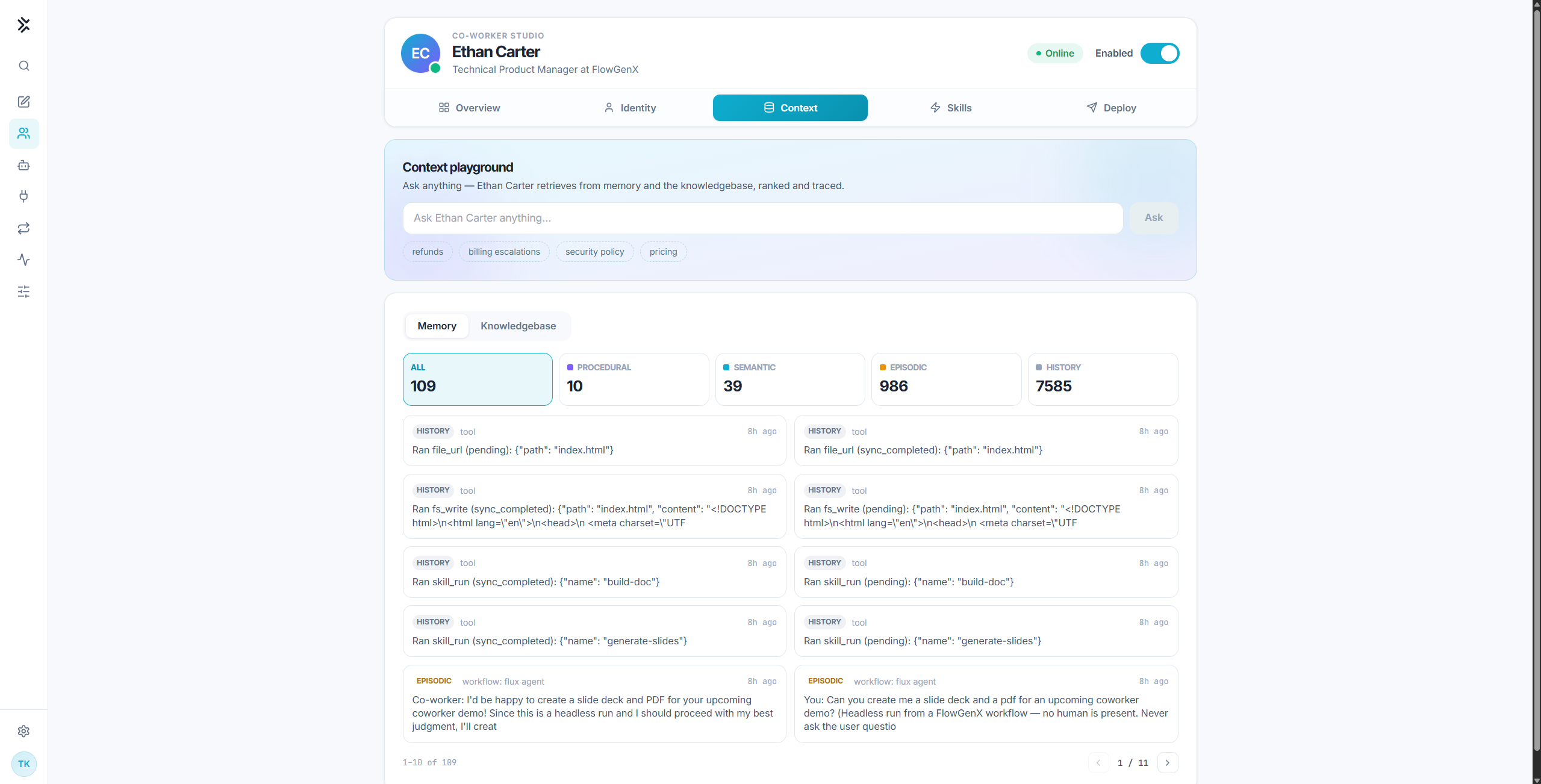
The counts on that screen are four separate stores, and the split is the point. Most products call all of this "memory" and mean a transcript.
- Procedural, 10 entries. How to do things. The saved routes he reaches for, including the
clickup-workspace-scanhe loads at the top of this post. This is the store that grows when a run goes well. - Semantic, 39 entries. What's true about the business. Who owns which surface, which board is the real one, what "shipped" means here. Facts that stay true after the conversation ends, so nobody re-explains them.
- Episodic, 986 entries. What happened. Individual runs and what he did about them, including the headless ones nobody watched. This is where accountability stops being a promise.
- History, 7,585 entries. Every tool call, in order, replayable. The difference between asking "did the digest go out?" and looking it up.
Getting the learning half right was harder than it sounds, because a loop that keeps the wrong lesson is worse than no loop at all. We found a run where the sandbox had crashed inside the code but exited cleanly at the process level. The loop read it as a success and was ready to save a broken route as a skill. So learning now requires evidence the run actually produced something, and saving a skill extends what's already there instead of quietly replacing it. A playbook your team refined shouldn't disappear because a later run found a shortcut.
That's also why the fourth box in the loop says promoted only with human approval. Ethan doesn't get to grade his own homework.
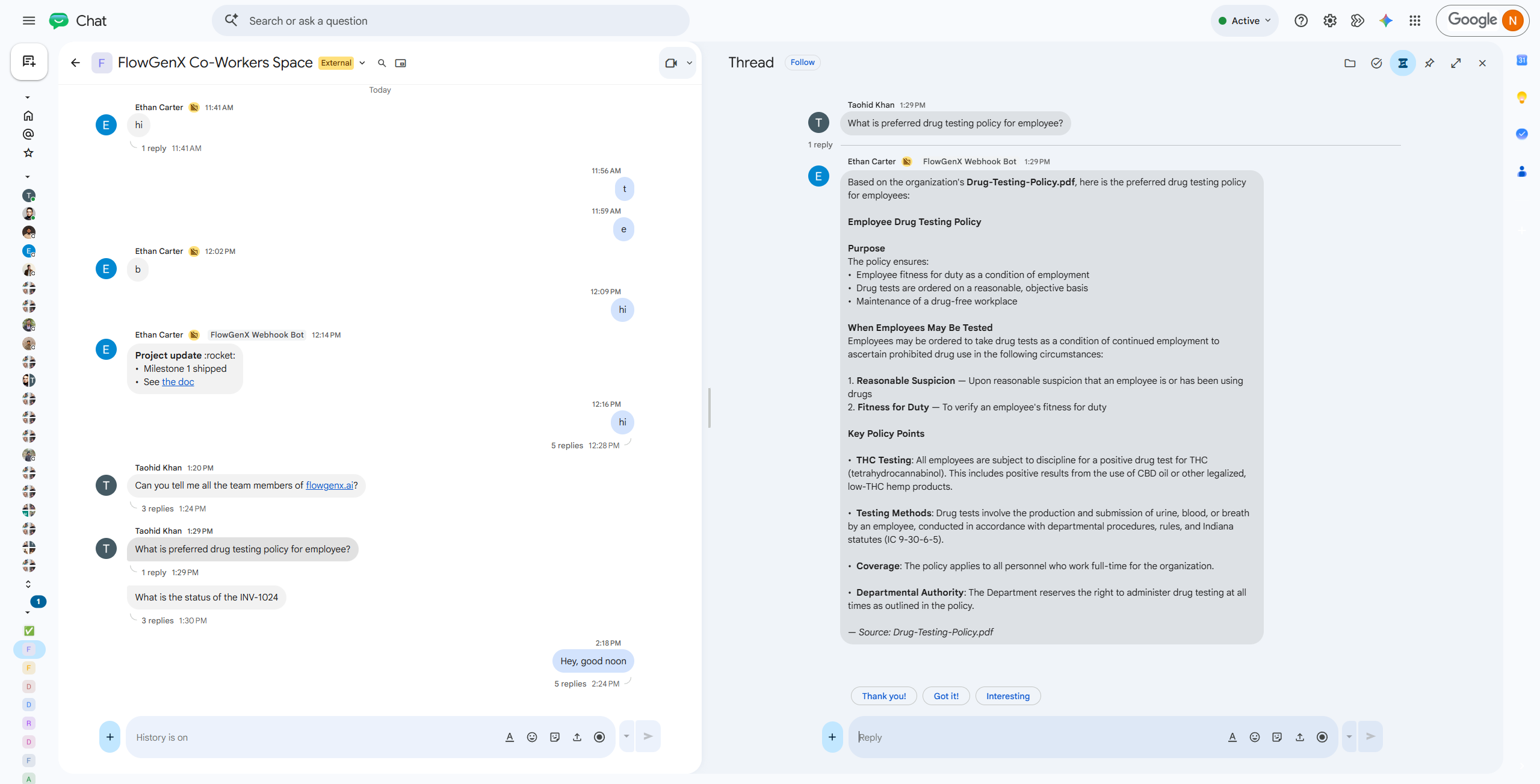
He works when nobody is watching
Look at the episodic entries in that last screenshot and you'll find a run with no human in it at all:
You: Can you create me a slide deck and a pdf for an upcoming coworker demo? (Headless run from a FlowGenX workflow, no human is present. Never ask the user questions...)
Co-worker: I'd be happy to create a slide deck and PDF for your upcoming coworker demo. Since this is a headless run and I should proceed with my best judgment, I'll create...
Same employee, no chat window, running as a node inside a workflow.
Files come back twice over: as a link a human can click, and as a structured entry carrying the name, kind, MIME type, size and URL, so the next node in the workflow can pick it up without parsing prose.
Autonomy you can sign off on
An employee with system access needs the same controls as any other employee, and ours are boring on purpose.
- Its own identity and scope. Own credentials, own RBAC. It can't reach anything the role doesn't hand it, and every action in every system carries its name.
- Tool tiers. Tools are graded by blast radius, T0 through T3. The low tiers run unattended. Anything that changes or destroys something stops and asks.
- Governed memory. Learnings are reviewed, versioned and revertible. If it learned something wrong on Tuesday, you take it back on Wednesday.
- Audit and replay. Every decision and tool call is traced. You replay a run rather than reconstruct it.
- Budgets and a scorecard. You cap what a coworker can spend, and you can see how it's performing.
- A one-switch emergency stop, and an Enabled toggle on every profile.
- A watchdog on every call, so a hung integration becomes a normal error after a few minutes instead of a turn frozen for eight with nothing on screen.
One more that vendors rarely mention, and it's the reason you can pilot this safely. Coworker behaviour is gated on the persona being published. Switch it off and the platform doesn't degrade into a slightly different product. It behaves exactly as it did before, on the same code path.
Whatever happens, the turn ends with an honest answer, including "I couldn't verify this." Trust comes from being predictable, not from being confident.
What everyone else is building, and where it runs out
The field is strong and I don't think anyone in it is confused. The shape of the unit is just different almost everywhere you look.
| The shape | What the unit is | Where it runs out |
|---|---|---|
| Search-first assistant, agents on top | An index of your company, plus agents you compose | Knows a great deal, does comparatively little. The answer is the product |
| Agents inside the system of record | An agent scoped to one platform | Powerful precisely because it never leaves. Fine until work crosses a boundary, which most work does |
| A named worker per go-to-market role | A persona per function | Close to our framing, except the playbooks ship from the vendor and memory tends to be per-contact rather than per-colleague |
| A canvas of narrow agents | A graph you assemble | Enormously flexible. Somebody has to build and maintain it, and that somebody now owns a second product |
| A configured colleague | One account with identity, memory, tools and skills | Only as safe as its scope. Give one persona every connector and you've built an admin account with a name |
The common thread across the first four: a human builds the automations in a builder, and improvement happens when a vendor tunes something.
Ethan writes his own, from chat. You ask, and if it's the kind of thing that should run every Monday morning, he sets that up himself.
Hire one this week
The honest pitch is small. Pick one role where the repeatable part is obvious and the judgment clearly stays human. Give it a name, a title, a personality and a job description. Connect only the apps that role actually needs, point it at the documents that role actually reads, and drop it into the channels where that work already gets discussed. Publish.
Then treat it like a new hire. Watch the first week's traces. Correct what it learned. Take back anything wrong.
It'll run the repeatable 60 percent of one job. Your people keep the judgment, the relationships and the decisions. When that works, you hire the next one, for the next role, with the next set of keys.
And on the morning somebody asks why a release slipped, the answer is already in the thread, with the task, the owner, and how long it has been sitting there.
Ready to configure your first AI coworker?
Start with one role, one repeatable outcome, and only the systems that role needs.
With FlowGenX Co-worker, you can configure its identity, job description, skills, memory, permissions, and operating boundaries—then deploy it into the channels and workflows where your team already works.
Schedule a working session with us. We’ll help you identify the right first use case, define a governed pilot, and configure your first AI coworker.
Prefer to see it in action first? [Request A Demo]
Join the conversation with your LinkedIn or Google account