

Most teams start with one LLM. They pick a good model, wire it into the product, and send it everything: the one-line classification, the 40-page contract review, the agent's fifth tool call in a row. It works. Then the bill arrives, the provider has a bad afternoon, or a new model ships that is better at half the price, and "one model for everything" starts to look like a decision nobody actually made.
LLM routing is how teams make that decision on purpose, call by call. This post covers what routing is, what the market offers, where it pays off and what to look for. Then it shows what we built into FlowGenX.
Why one model for everything stops working
The price gap is enormous. On today's list prices, a frontier model costs about 100 times more per output token than a small one from the same vendor. Claude Fable 5.1 is $50 per million output tokens and Claude Haiku 5.5 is $0.50. OpenAI's GPT-6 Astra and GPT-6 Luna sit on the same two price points.
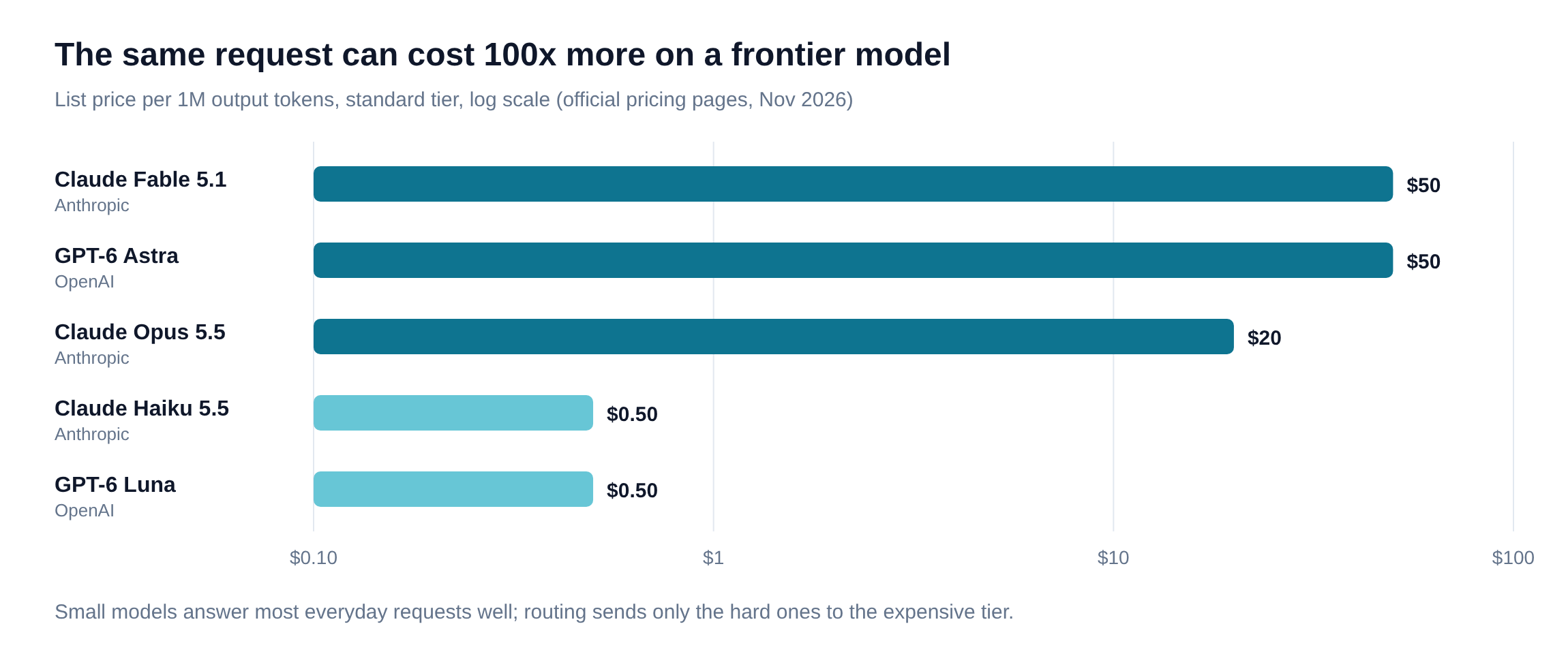
Most requests in a real product are not frontier problems. Rewriting a sentence, pulling a date out of an email, or picking the next tool doesn't need the strongest model on the market. If every call goes to the top tier, the easy majority pays frontier prices.
Providers go down. On 10–11 June 2025, OpenAI's status page recorded a partial outage of about 15 hours across ten API components, including Chat Completions and Embeddings. On 8 July 2026, Anthropic reported almost two hours of elevated errors across its API, claude.ai and Claude Code. Rate limits hit more often than outages, and they hit hardest when traffic peaks. A product tied to one model on one key is down whenever that model is.
Models change faster than products. Every few months a new model is cheaper, faster or better at some task you care about. Without a layer in between, each switch is a code change across every agent and workflow.
Different jobs want different models. Long context, vision, strict JSON, tool calling, latency: no single model is best at all of them, and the best choice for each moves every quarter.
What LLM routing is
LMSYS, the group behind Chatbot Arena, puts it simply: each query first goes to a system that decides which model should handle it. Queries a weaker model can handle go there, and the rest go to a stronger one. Cost goes down and quality holds.
In practice, "routing" covers three layers, and most production setups stack all three.
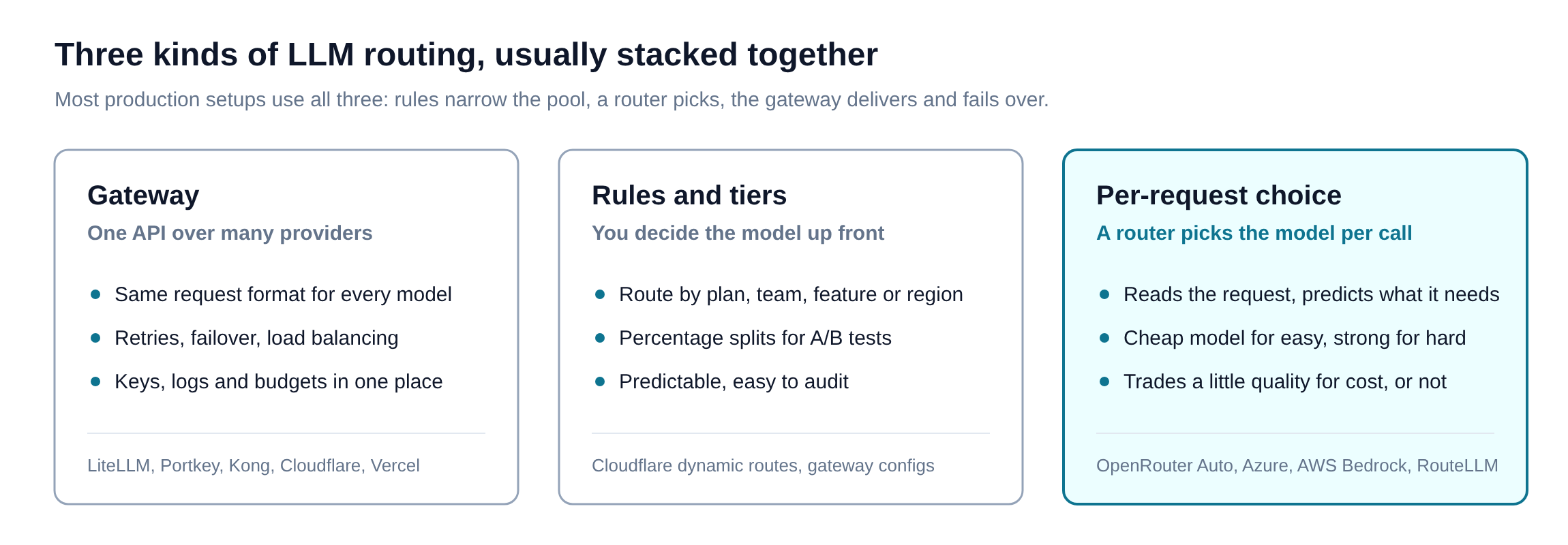
- A gateway gives one API over many providers. Every model is called the same way. Retries, failover, keys, logs and budgets live in one place. LiteLLM, Portkey, Kong, Cloudflare and Vercel all offer this.
- Rules and tiers decide the model up front, based on what you know about the request: the customer's plan, the team, the feature, the region. Cloudflare's dynamic routes, for example, branch on fields like
user_planand split traffic by percentage for A/B tests. - Per-request choice is the newest layer. A router reads each request and predicts which model will handle it well enough at the lowest cost. Research systems such as RouteLLM and FrugalGPT, AWS Bedrock's Intelligent Prompt Routing, Microsoft's model router in Azure AI Foundry and OpenRouter's Auto Router all work this way.
OpenAI built the same idea into ChatGPT. Its GPT-5 system card describes "a real-time router that quickly decides which model to use based on conversation type, complexity, tool needs, and explicit intent".
What the market offers
| Product | Kind | What it does for routing |
|---|---|---|
| OpenRouter | Gateway + router | Auto Router picks a model and reasoning effort per request, with cost tiers and session stickiness. Ordered fallbacks are billed at the model that answered. |
| Azure AI Foundry model router | Router | A trained routing model across 43 models from six vendors, with Balanced, Quality and Cost modes, session affinity and automatic failover. |
| AWS Bedrock Intelligent Prompt Routing | Router | Routes within one model family by predicted response quality, with a fallback model. Optimised for English prompts. |
| RouteLLM (LMSYS) | Router, open source | Trained routers that choose between a strong and a weak model. |
| Not Diamond | Router | A per-input model router, now aimed at coding agents. |
| LiteLLM | Gateway | Routing strategies (least busy, lowest latency, lowest cost), ordered fallbacks, retries and cooldowns. |
| Portkey | Gateway | Fallbacks, load balancing, conditional routing, caching and budgets. |
| Kong AI Gateway | Gateway | Seven load-balancing algorithms, failover, semantic cache and token budgets per team. |
| Cloudflare AI Gateway | Gateway + rules | Caching, rate limits, fallbacks and dynamic routes on request metadata. |
| Vercel AI Gateway | Gateway | Provider and model fallbacks, budgets, caching and bring-your-own-key, with no markup. |
Two things stand out. Gateways are mature and widely available. Per-request choice is newer, and the vendors are careful about it: AWS says its router "might not always provide the most optimal routing for unique or specialized use cases". Azure tells customers to compare the router with their current model "on your own prompts" before moving production traffic.
What the numbers say
The research results are strong. LMSYS reported that RouteLLM cut costs by over 85% on MT Bench, 45% on MMLU and 35% on GSM8K compared with sending everything to GPT-4, while reaching 95% of GPT-4's quality. FrugalGPT reported matching GPT-4 with up to 98% cost reduction on its benchmarks.
Vendors make more modest claims. AWS says Intelligent Prompt Routing "can reduce costs by up to 30% without compromising on accuracy". Azure promises "frontier-level quality at a lower cost" but publishes no percentage.
The honest summary: routing can save a lot when much of your traffic is easy, and the only number that matters is the one measured on your own workload.
Caching changes the maths. Providers now discount repeated prompt prefixes heavily:
- Anthropic bills cached input at a tenth of the normal price or less, and charges 1.25x to write the cache.
- OpenAI discounts cached tokens "up to 95%".
A long system prompt or an agent's growing history can be most of every call. A router that switches models mid-conversation throws that cache away. That's why OpenRouter's router is "restrained" about switching, and Azure keeps a session on one model "so prompt-cache hits keep lowering your cost and latency". Good routing decides per conversation as much as per call.
Where routing earns its keep
- Agents with many steps. An agent run might make twenty calls. Most are small: classify, extract, choose a tool. A few need real reasoning. Azure's documentation recommends exactly this split: a fast model for quick steps and a reasoning model for planning.
- Support and Q&A over your documents. Most questions are routine. AWS reports 63.6% average savings on its retrieval test sets, with about 87% of prompts going to the small model.
- Multi-tenant SaaS. Different customers, plans and features need different models, budgets and limits. Rules route by tenant or plan, and budgets keep one tenant from spending everyone's money.
- Cost control. Budgets that stop spending at a limit are table stakes. Vercel, for example, returns HTTP 402 once a budget is used up.
- Resilience. Failover to a second model or provider turns an outage into a slower answer rather than an error page.
- Compliance and data residency. Some requests must stay in a region, or only go to providers that keep no data. Routing rules enforce that per call.
- Avoiding lock-in. When every call goes through one layer, adopting a new model is a configuration change.
What to look for in a router
Choosing a router is choosing what sits between your product and every model call. Ask:
- Which failures trigger failover, and how far? Rate limits, 5xx errors, timeouts and context-length errors should move the call to another model. A model that keeps failing should be taken out of rotation, not retried forever.
- Can you see which model answered? Every request should record the model that served it, the attempts before it, the latency, tokens and cost.
- Are budgets hard or soft, and do they cover your own keys? Some gateways' budgets are soft caps, and some don't count bring-your-own-key spend at all.
- Does it keep conversations on one model, and pass provider caching through? If not, part of what routing saves is lost to cache misses.
- What does it add in latency? Gateways add milliseconds. A router that runs a model to decide adds its own decision step. Ask for measured numbers.
- Where do your prompts and keys go? Bring-your-own-key support, whether prompts are stored, and which regions are used all matter.
- What does the router itself cost? Some charge a routing fee per token, and others add nothing beyond the model's price.
- Can you test it on your own traffic first? Both AWS and Azure say you should, and a "watch only" mode that logs what the router would have done is the safest way.
- Can you constrain the pool? You should be able to choose which models are allowed. Watch for pools where the context window shrinks to the smallest member, or where unsupported parameters are silently dropped.
Introducing the FlowGenX AI Router
FlowGenX runs agents, workflows and AI teammates for our customers. Every one of them calls LLMs constantly, so we built routing into the platform rather than bolting a gateway on beside it. The FlowGenX AI Router sits between everything you build on FlowGenX and every model it calls.
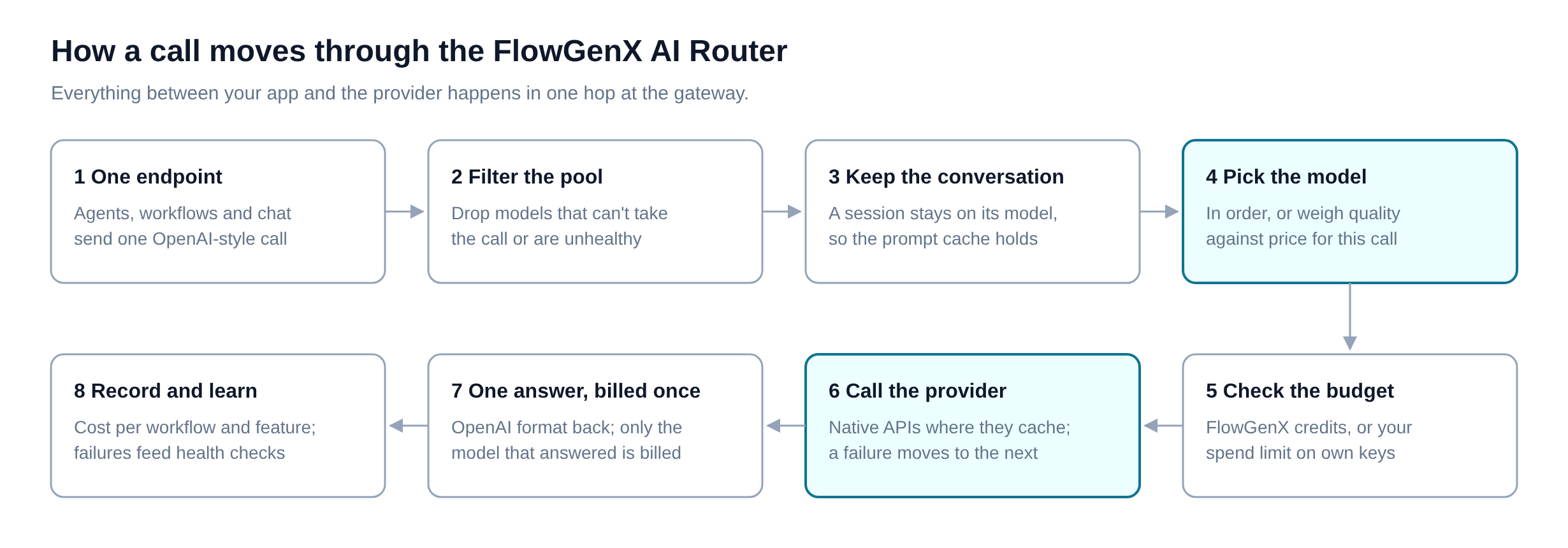
One endpoint for FlowGenX AI and your own models
Every agent, workflow and chat sends one OpenAI-style call with one FlowGenX key. That call can name:
- a FlowGenX AI model, supplied by us and paid from prepaid FlowGenX Credits;
- one of your own models, connected with your own provider key and billed to your account with that provider;
- a model group of your own models.
Switching between them means changing the model name, not the code. Your provider keys stay private, and so do the details of the models behind FlowGenX AI.
Model groups: in order, or smart
A model group bundles up to 20 of your models. Callers name the group instead of a model, and the router picks the member for each call.
- In order. Every call tries the models top to bottom. If the first is down, rate-limited or can't handle the request (no vision, too long, no tool support), the next one takes over automatically.
- Smart. Our decision model reads each call and weighs quality against price within the group. You choose Cost (the cheapest model that can handle the call), Balanced, or Quality (the strongest model, whatever it costs).
- The decision model can only overrule the group's priority order when it is confident enough in its pick.
- If it is unsure, slow (over 300 ms) or unavailable, the call goes to the group's priority pick instead. A smart group never fails a call that the ordered group would have served.
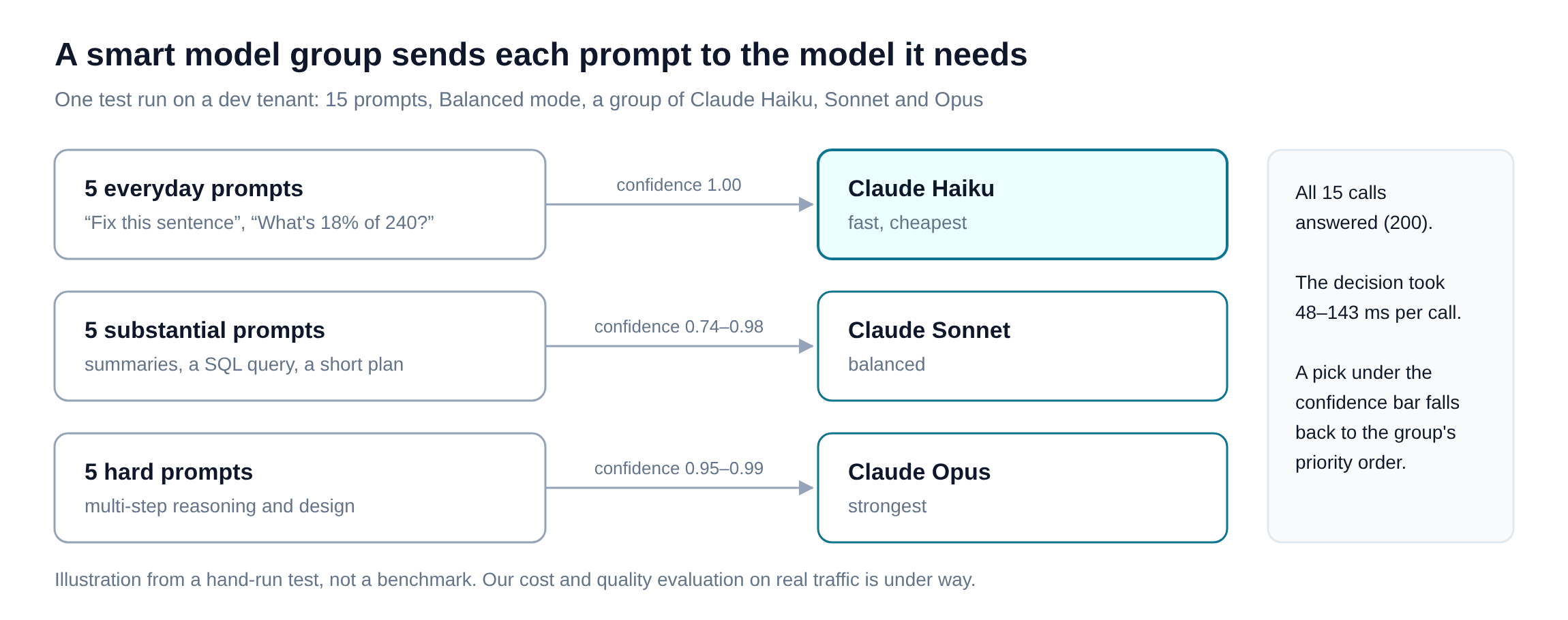
In one test run on a dev tenant, a Balanced group of Claude Haiku, Sonnet and Opus received 15 prompts:
- the five everyday ones went to Haiku;
- the five substantial ones went to Sonnet;
- the five hard ones went to Opus.
Each decision took 48–143 ms. You can run a smart group in Shadow first: it records what it would have picked while the priority order keeps serving. You see the decisions before you trust them.
Failover that bills once
When the chosen model fails with a rate limit, a server error or a timeout, the same request moves to the next model. That happens up to three attempts, within the one call your app made. Your app gets one answer, and you are billed once, for the model that answered. A rate limit also skips the other models that share the same provider key, since they would hit the same limit.
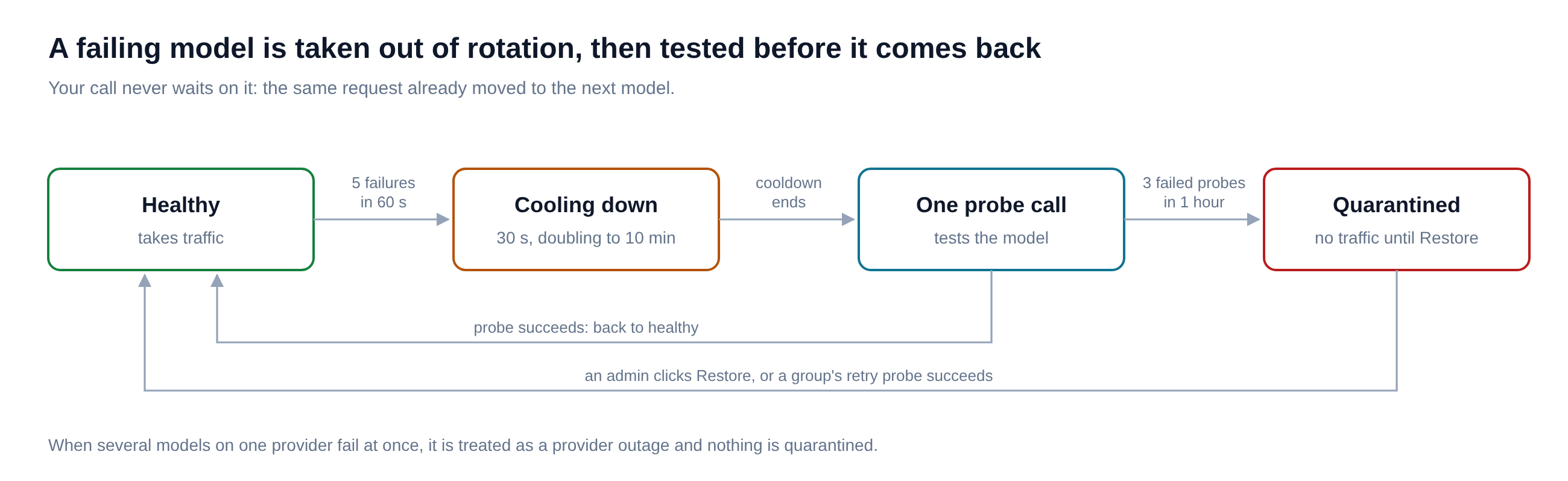
Models that keep failing are taken out of rotation:
- Cooling down: five failures within 60 seconds rest the model for 30 seconds. The rest doubles up to ten minutes, and then a single probe call tests it.
- Quarantined: three failed probes within an hour quarantine the model until someone clicks Restore. A model group can instead retry its quarantined members on a timer.
- Provider outages: when several models on one provider fail together, the router treats it as a provider outage and doesn't quarantine your models for it.
In our failover test, one model was made to fail on purpose. All 48 calls still answered through the fallback, the failing model was quarantined on schedule, and every call was billed exactly once.
Conversations stay on their model, and the cache keeps working
All turns of a chat session, and all calls of one agent in a workflow run, stay on the same model for as long as the conversation is active. By default that's 30 minutes after the last call, and you can set up to 24 hours. A smart group still checks later turns. It moves a conversation only when it is at least 90% sure, so a chat that turns hard can step up without throwing away the cache for small gains.
We also fixed a gap most gateways share. Anthropic's OpenAI-compatible endpoint doesn't support prompt caching, so the router sends Claude calls through Anthropic's native API and converts the answers back. Before the change, none of 110 Claude calls in a week read from the cache. After it, from the second turn of a conversation, 99% of a 7,000-token prompt was read from cache. Anthropic bills those tokens at a tenth of the normal input price. Your code doesn't change: the router adds the cache markers to conversations and agent runs, and keeps any you set yourself.
Cost you can see, and cap
- Cost per call, attributed. Every call records its cost against the workflow, feature and environment that made it. Usage views per model and per group show which model answered each request and after which failed attempts, and what each hour, day or month cost.
- FlowGenX Credits. FlowGenX AI models draw from a prepaid credit wallet. Calls to your own models never touch it, and analytics keeps the two apart.
- Spend limits on your own models (rolling out now). Set a USD cap on what all your own models may spend together. It can apply for good, per calendar month, or every N days. You'll see alerts at 75%, 90% and 100%. At the cap, calls to your own models stop with a clear message, while FlowGenX AI keeps working.
Auto routing for FlowGenX AI
The same decision model will also route calls to FlowGenX AI across our pool, from fast models to frontier ones. Rules per feature can set a minimum reasoning level. Today it runs in watch-only mode: it records the model it would have chosen while the default model answers every call. We will switch it on once our evaluation on real traffic shows the savings without a quality drop. That's the standard we'd ask of any router.
How it measures up
| What to look for | FlowGenX AI Router |
|---|---|
| Failover with clear triggers | Rate limits, server errors and timeouts retried on the next model, up to 3 attempts; failing models cooled down, probed and quarantined |
| Which model answered | Recorded on every call, with the failed attempts before it |
| Budgets that cover your own keys | FlowGenX Credits for our models; hard spend limits on your own keys (rolling out) |
| Caching and stickiness | Conversations stay on one model; Claude calls use Anthropic's native caching |
| Decision latency | Decision model capped at 300 ms, falling back to the priority order |
| Keys and privacy | Your provider keys stay yours; model details stay masked |
| Testing before trusting | Shadow mode for smart groups; watch-only for auto routing |
| Control over the pool | You choose the members and their order; the router skips models that can't handle a request |
Getting started
If you already use FlowGenX, the router is already in the path of every LLM call your agents and workflows make. To try it:
- Connect your own model keys under LLM Models, or use FlowGenX AI.
- Create a model group with two or three models in priority order, and point an agent or workflow at it.
- Switch the group to Smart in Shadow mode, and watch which model it would pick for each call in the group's usage view.
Then go Live when the picks look right.
One model was a fine way to start. Routing is how you keep the quality and stop paying frontier prices for easy work.
Sources
- LMSYS, RouteLLM: An open-source framework for cost-effective LLM routing (1 Jul 2024): https://lmsys.org/blog/2024-07-01-routellm/ · paper: https://arxiv.org/abs/2406.18665
- Chen, Zaharia, Zou, FrugalGPT (2023): https://arxiv.org/abs/2305.05176
- OpenAI, GPT-5 system card (13 Aug 2025): https://cdn.openai.com/gpt-5-system-card.pdf
- Anthropic pricing: https://platform.claude.com/docs/en/about-claude/pricing · prompt caching: https://platform.claude.com/docs/en/build-with-claude/prompt-caching
- OpenAI pricing: https://developers.openai.com/api/docs/pricing · prompt caching: https://developers.openai.com/api/docs/guides/prompt-caching
- OpenAI status, 10–11 Jun 2025 incident: https://status.openai.com/incidents/01JXCAW3K3JAE0EP56AEZ7CBG3
- Anthropic status, 8 Jul 2026 incident: https://status.claude.com/incidents/dcxc66flmxbd
- OpenRouter model routing: https://openrouter.ai/docs/features/model-routing · fallbacks: https://openrouter.ai/docs/guides/routing/model-fallbacks
- Microsoft, model router for Azure AI Foundry: https://learn.microsoft.com/en-us/azure/ai-foundry/openai/concepts/model-router
- AWS, Bedrock Intelligent Prompt Routing: https://docs.aws.amazon.com/bedrock/latest/userguide/prompt-routing.html · https://aws.amazon.com/bedrock/intelligent-prompt-routing/ · https://aws.amazon.com/blogs/machine-learning/use-amazon-bedrock-intelligent-prompt-routing-for-cost-and-latency-benefits/
- RouteLLM on GitHub: https://github.com/lm-sys/RouteLLM
- Not Diamond: https://www.notdiamond.ai/
- LiteLLM routing: https://docs.litellm.ai/docs/routing
- Portkey AI Gateway: https://portkey.ai/docs/product/ai-gateway
- Kong AI Gateway: https://developer.konghq.com/ai-gateway/ · load balancing: https://developer.konghq.com/ai-gateway/load-balancing/
- Cloudflare AI Gateway: https://developers.cloudflare.com/ai-gateway/ · dynamic routing: https://developers.cloudflare.com/ai-gateway/features/dynamic-routing/
- Vercel AI Gateway: https://vercel.com/docs/ai-gateway
- FlowGenX figures (prompt cache, failover test, smart group run, decision latency) are from our own tests on a development environment, November 2026.

Join the conversation with your LinkedIn or Google account