
Building integrations should not feel like a second job. Yet for many teams, automation still means manually dragging nodes, configuring connectors, reading API documentation, and translating business intent into technical workflow logic.
The people who understand the business process best are often not the same people who know how to wire every system together. That gap slows teams down and makes automation harder than it needs to be.
FlowCopilot is designed to close that gap.
With FlowCopilot, users can describe what they want in plain English, and FlowGenX AI generates a complete visual workflow graph directly on the canvas — ready to review, refine, and deploy.
FlowCopilot brings conversational AI into the FlowGenX workflow editor, helping teams move from business intent to governed automation faster.
What is FlowCopilot?
FlowCopilot is a conversational AI assistant built directly into the FlowGenX workflow editor. Instead of manually assembling workflows node by node, you simply describe what you want in plain English — and FlowCopilot generates a complete, visual workflow graph on your canvas.
It's not a one-shot generator. FlowCopilot is conversational. You can refine your request, ask follow-up questions, and iterate until the workflow matches exactly what you need. If your description is incomplete or unclear, FlowCopilot asks targeted clarification questions before generating the workflow. That means the AI does not simply guess. It works with you to understand the intent before creating the graph.
FlowCopilot understands the full breadth of FlowGenX's capabilities, spanning 80+ node types — triggers, actions, AI agents, agentic tools, memory stores, transformations, browser automation, and the connector library. Whether you're building a simple notification pipeline or a multi-step orchestration across your entire tool stack, FlowCopilot speaks your language.
How It Works
Using FlowCopilot feels less like programming and more like collaborating with a colleague who understands integration patterns, workflow design, and enterprise automation. The panel adapts to how you work — a compact band at the bottom of the canvas for quick refinements, a draggable floating panel when you want to step it aside, or an expanded view when you want to focus. The conversation, the review state, and your in-flight changes follow you between modes.
Describe your workflow. Open the FlowCopilot panel and tell it what you need. Something as simple as "When a new lead comes in from our web form, enrich it with company data, score it, and route high-value leads to the sales team on Slack while adding them to our CRM" is all it takes. Starter prompt cards — Slack-on-webhook, daily database digest, AI ticket triager, Stripe-to-CRM sync — give you a few one-click ideas, but anything in your own words works just as well.
Get clarification when it matters. If your description leaves room for interpretation, FlowCopilot won't guess. It pauses and asks targeted questions before generating — a focused stack of clarifications you answer inline, then generation kicks off with your real intent locked in.
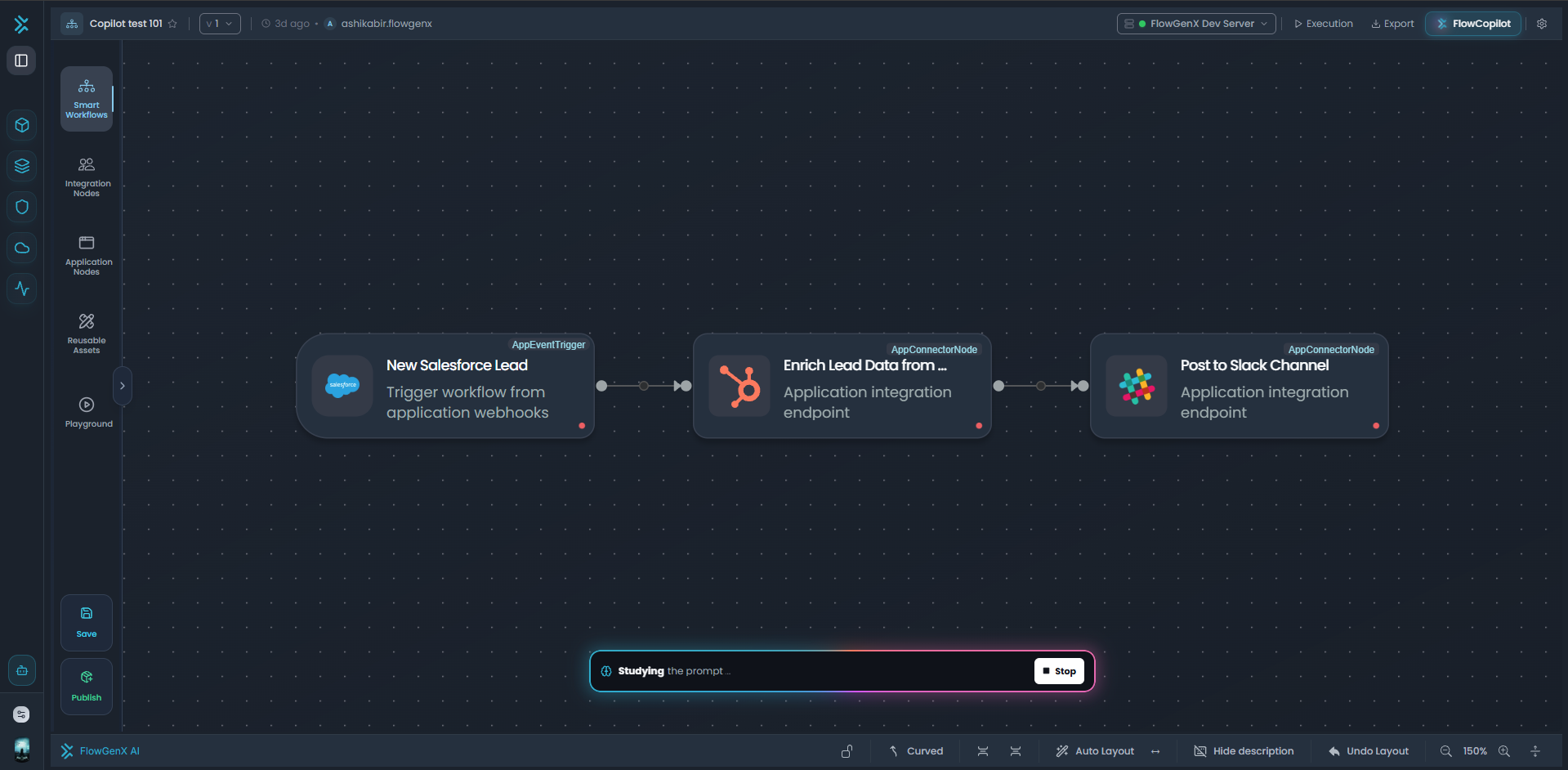
Watch it come together. FlowCopilot streams its reasoning in real time through every phase — understanding your intent, planning the graph, generating each operator, validating the structure, auto-fixing wiring errors, and formatting the result. The progress is narrated with a touch of personality ("Sketching the route," "Knitting the graph," "Inspecting the wiring"), so the wait feels less like a black box and more like watching a colleague work.
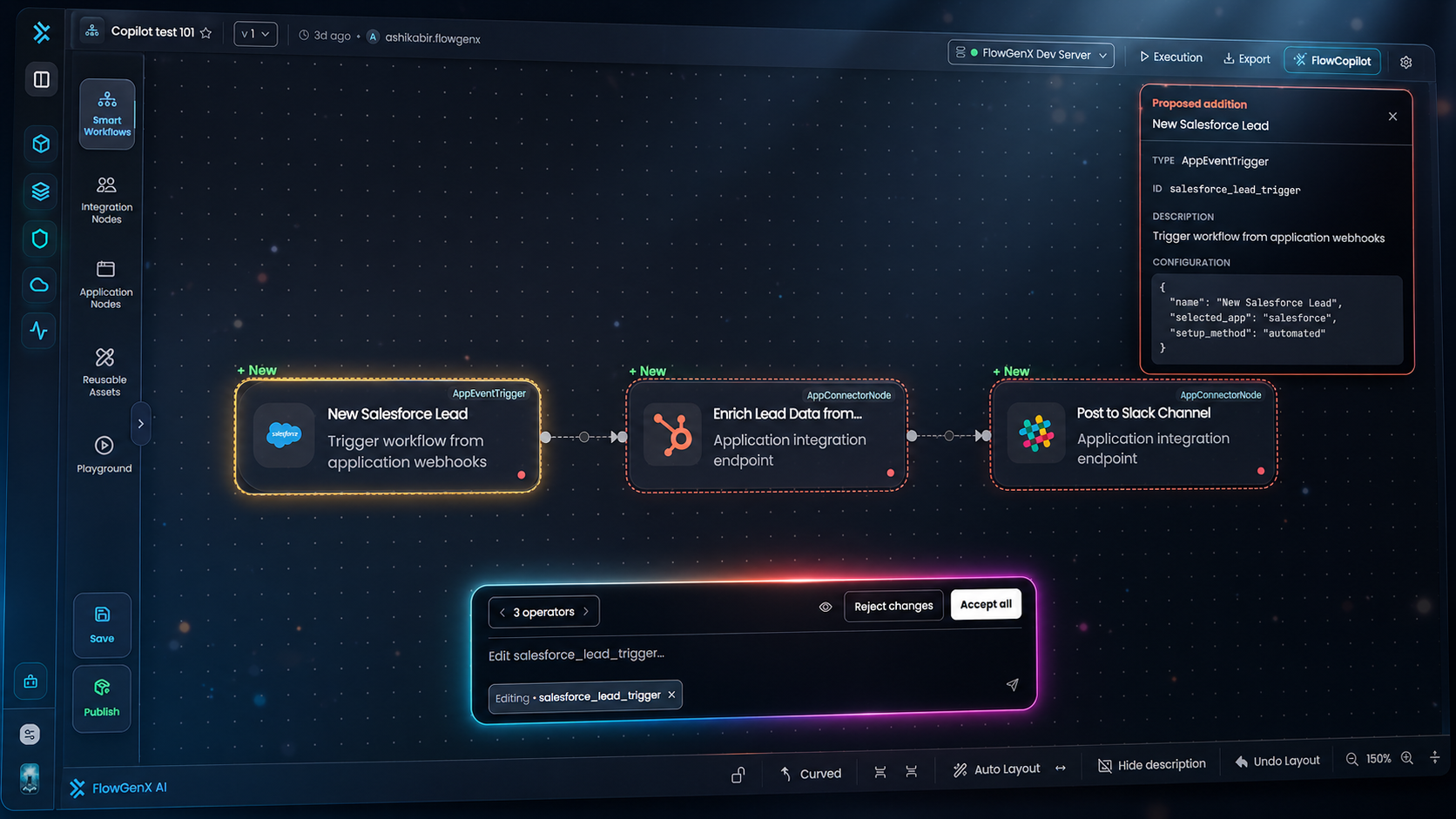
Review every change before it lands. Generated nodes appear on your canvas in a pending state — outlined in coral and slightly faded so they read as proposals, not commitments. New nodes get a "+ New" tag; modified nodes get one too. Click any pending node to open the OperatorInspector: it shows the operator's name, type, description, and full configuration. For refinements that update an existing node, the inspector renders a side-by-side diff — red-striped Before alongside green-striped After — and chips out the exact configuration keys that changed.
Page through the changes. A review band lets you step through every proposed operator with prev/next paging. The focused operator gets a deep-yellow ring on the canvas so you always know which node you're inspecting. Toggle the inspector on or off with a single click — it stays out of your way when you'd rather just scan the graph.
Refine in conversation. Not quite right? Just tell FlowCopilot: "Add an error notification if the CRM update fails" or "Use email instead of Slack for the notification step." It keeps the full conversation in mind, so each refinement builds on what came before. Existing pending nodes keep their internal IDs across iterations, so any expressions or downstream references that point at them stay intact while the AI iterates on the parts you want changed.
Accept or reject. When you're satisfied, hit Accept all and the pending nodes commit to the canvas, ready to configure and deploy. Reject changes rolls everything back to your pre-AI snapshot. Iterate as many times as you need — there's no penalty for exploring.
No code. No manual node dragging. No hunting through configuration menus. Just describe, review, and go.
What Makes FlowCopilot Different
The automation space is quickly filling with AI-assisted features. Many tools can suggest a step, generate a script, or provide a code snippet. FlowCopilot takes a different approach.
Visual-First Workflow Generation
FlowCopilot generates a complete visual workflow graph, not just a block of code or a static suggestion. Users can see the workflow structure, branches, connections, and execution logic directly on the FlowGenX canvas.
This matters because enterprise automation needs to be understandable. Teams should be able to see what will run before it runs.
Conversational Refinement
Real workflows rarely come from a perfect first prompt. FlowCopilot supports multi-turn refinement, allowing users to adjust the workflow through conversation. Each follow-up builds on the previous context, making workflow design more natural and iterative.
Enterprise Review and Control
AI-generated automation should not be a black box. FlowCopilot treats generated workflow changes as proposals, not automatic commitments. Users can inspect, review, accept, or reject changes before they become part of the workflow.
This review-first model is especially important for enterprise teams that need governance, accountability, and confidence in what gets deployed.
Connector-Aware Intelligence
FlowCopilot understands the tools and connections available in the FlowGenX workspace. When a user says “send a notification,” “update the CRM,” or “query the database,” FlowCopilot can map that intent to the relevant connectors, actions, and workflow operators available in the environment.
This makes the experience practical, not just conversational. The generated workflow is aligned with the systems the organization actually uses.
Built-In Validation
Before workflows are deployed, FlowCopilot validates the generated graph for structural correctness. It checks that node types exist, connections are valid, branches are properly wired, and the workflow follows expected execution rules.
That helps teams catch issues earlier and reduce the risk of discovering problems only after deployment.
Built for Governed Enterprise Automation
FlowCopilot is not just about making workflow creation faster. It is about making workflow creation faster without giving up control.
Enterprise teams need automation that is visual, explainable, reviewable, and governed. They need to know what the AI created, why it created it, and what changed before anything is committed.
That is the direction FlowGenX AI is building toward: a platform where business users, developers, operators, and AI agents can collaborate on automation with the right level of visibility and control.
FlowCopilot helps teams move from idea to workflow faster while keeping humans in the loop.
What's Coming Next
FlowCopilot is just the beginning. We are continuing to expand its capabilities across workflow design, documentation, optimization, and production learning.
Upcoming capabilities include:
Smart workflow suggestions that proactively recommend improvements, error handling, and optimization opportunities.
Auth-aware setup that guides users through connecting new apps directly from the conversation.
Node documentation and Q&A so users can ask FlowCopilot how a specific operator works or how it should be configured.
Business use case correlation that maps business outcomes, such as reducing customer response time or improving lead conversion, to concrete workflow patterns.
Auto-documentation that generates human-readable workflow documentation and keeps it aligned as workflows evolve.
Over time, FlowCopilot will also learn from production workflow performance, helping future workflow generation become smarter, more reliable, and more aligned with real enterprise outcomes.
Get Started
FlowCopilot is now available in FlowGenX AI, giving teams a new way to build enterprise workflows by simply describing what they want to automate.
If you are tired of spending more time configuring than creating, FlowCopilot was built for you.
Visit flowgenx.ai to learn more and start building with FlowCopilot.
Stop configuring. Start describing.

Join the conversation with your LinkedIn or Google account